

How buying works
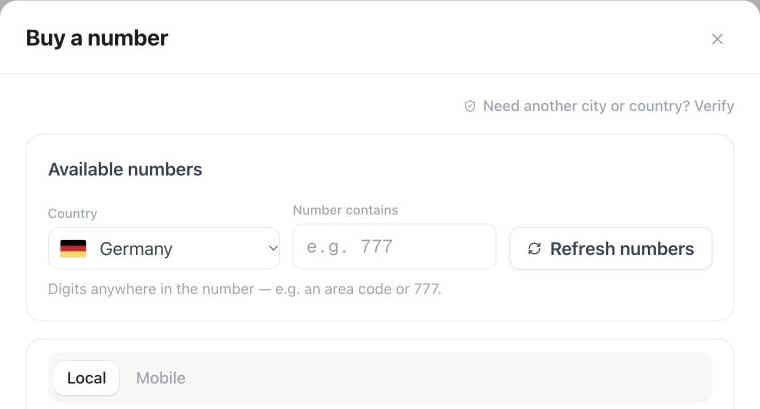
Settings → Phone numbers → Add a number → Buy a number: choose Country, optionally fill Number contains, and use Local or Mobile to narrow the search.
1
Search
Go to Settings → Numbers → Add a number → Buy a number and pick a country. When more than one number type is buyable, or you have a workspace/user regulatory bundle, tabs appear above the list (Local, Mobile, and your bundle name). A single type with only a global unlock shows every available number with no tabs — same as before.
2
Complete regulatory requirements (if any)
Many countries legally require identity or address verification before a number can be activated — see below.
3
Buy
The monthly price and any setup fee are shown up front. Complete the secure checkout. The number remains pending and cannot receive or place calls until payment is confirmed.You can optionally assign an assistant during purchase. Only assistants without an inbound number are shown; pending number reservations also count. You can leave the number unassigned and connect an assistant later.
4
Payment-confirmed activation
A verified payment event provisions routing and activates the number. Failed, expired, or unpaid purchases automatically release the held number and grant no call access.
5
Assign an assistant
Point the number at an assistant — inbound calls are answered from that second on. The same number can be used as outbound caller ID.
Country availability & pricing
Available countries and number types are shown in the marketplace. It sells local, mobile, and national numbers; toll-free is not currently sold. The checkout shows the monthly price and any one-time setup fee before purchase. Prices differ by country and number type.Pricing & checkout: The live price and setup fee displayed in the checkout modal are authoritative. Older marketing landing pages citing €2/month are outdated. For example, standard German local numbers (Ortsnetz) are currently €2.50/month + a one-time setup fee of €5.99.
German local numbers (Ortsnetz)
German local phone numbers are subject to specific regulatory and inventory rules:- Live marketplace stock: Availability reflects live network inventory. Numbers in major metropolitan area codes such as Berlin (
+49 30/030) and Stuttgart (+49 711/0711) are commonly stocked and immediately available for purchase. - Specific or missing area codes: Germany has over 5,200 local area codes. If a specific area code (for example
07274Germersheim) does not currently show available numbers in the general list:- Search with area code: Enter the specific local prefix into the marketplace search bar.
- Submit regulatory verification: German telecommunications law (TKG) mandates a verifiable physical address within the corresponding municipal area code. Go to Settings → Verification, select Germany, number type Local, and enter the prefix in international format (e.g.
07274as+497274) along with your local address documentation. - Custom provisioning: If an approved area code has no live inventory in the self-service marketplace, ask Milian in your dashboard to open a provisioning ticket. As a carrier, we provision numbers directly from our reserve pools for your verified municipality.
Regulatory bundles
Some countries and number types require identity verification before you can buy. The buy page shows only the types that are still locked. Everything else can be purchased immediately. After regulatory approval, eligible numbers become available for purchase and calling.How to verify
- Open Settings → Verification (or Buy a number → Custom number / Submit verification).
- The country list includes countries that require regulatory verification. API clients can use
GET /api/v1/phone-numbers/verifications/catalog. - Choose country, number type, end-user type (business or individual), and the required area code or prefix. National digits such as 0831 become +49831 for Germany. The form fields and accepted documents are loaded for that combination from the live regulation catalog.
- Submit the case. Status updates appear on the Verification page (
pending review→approved/rejected). If a case fails the automated check or is rejected, click Fix & resubmit: the form opens with your last details and documents, with the reasons shown at the top. Correct what they name, replace a document only if needed, and submit again. The case is updated instead of a new one being opened. If a verification for the same country, number type and area code is already in review or verified, the form warns you before sending a second one. If the registration asks for an authorized representative, enter their name exactly as it appears on the uploaded ID. - After approval, marketplace search/purchase for that country and type is unlocked for the workspace.
- List catalog / cases via the public API (
/api/v1/phone-numbers/verifications,/api/v1/phone-numbers/verifications/catalog) - Delete a draft or failed case with
DELETE /api/v1/phone-numbers/verifications/{id} - Read a case’s progress with
GET /api/v1/phone-numbers/verifications/{id}: the response includes atimelinewith the same steps. A case’sstatusis one ofdraft,pending_review,in_review,provisionally_approved,approved,rejected,failed. - Correct and resubmit your own failed or rejected case with
POST /api/v1/phone-numbers/verificationsandreplace_verification_id.GET /api/v1/phone-numbers/verifications/{id}/submissionreturns its last details; documents you don’t attach again are reused. - Use MCP tools
list_verification_catalog,list_number_verifications,submit_number_verification(withreplace_verification_idto resubmit),get_number_verification(includes the progress timeline; withinclude_submissionfor the last details),delete_number_verification
Plan ahead for regulated countries: review often takes a few business days (varies by country and document quality).
Outbound SMS
SMS-capable numbers (marketplace mobile numbers, or Twilio-imported numbers with SMS capability) can send outbound SMS through the platform after you enable Allow outbound SMS on the number’s SMS tab.- Marketplace numbers: SMS credits include the platform fee plus carrier pass-through.
- Twilio BYOC import: SMS credits charge only the platform fee; Twilio carrier cost is billed on your Twilio account. For US 10DLC → US traffic, the number must be registered with an approved A2P 10DLC campaign in Twilio.
POST /api/v1/sms/send. MCP: send_sms. See SMS for per-segment billing and the send API.
Complimentary (plan free) numbers
Some plans include a limited number of complimentary local marketplace numbers for selected countries. Mobile, national, and other number types remain paid. If the workspace plan is canceled or payment remains overdue, complimentary numbers are released automatically. Paid marketplace numbers are unaffected. Manual release of a complimentary number is immediate and cannot be undone.Releasing a paid marketplace number
When you release a paid marketplace number:- Renewal is canceled at the end of the current billing period.
- The number stays fully usable (inbound/outbound) until that period end.
- At period end, the number is released and can no longer be used.
Phone number limits & plan allowances
Your plan determines your quota for verified Caller IDs and complimentary marketplace numbers. Purchasing additional marketplace numbers and connecting SIP trunks are never limited by these quotas.Understanding number types and quotas
- Verified Caller IDs: Numbers you already own outside Famulor, verified once via phone call to present on outbound calls. These do not incur monthly number fees. Prepaid workspaces use the platform default quota; if verification is blocked with 0 slots, upgrade to a plan that includes Caller IDs (Plus 5, Pro 10, Agency 20).
- Complimentary marketplace DIDs: Full inbound and outbound marketplace numbers whose monthly rental fee is included with your plan. On the Agency plan, up to 3 local numbers in eligible countries (AT, CA, DE, FR, GB, US) are included at no extra monthly rental cost.
- Marketplace number capacity: You can buy and connect as many marketplace phone numbers as you need (unlimited across all plans, including Prepaid). Every purchased number is simply billed at its active marketplace monthly rate. Carrier imports and BYO SIP trunks are likewise unlimited.
Carrier costs on calls
Besides the monthly number fee, call-minute pricing can vary by destination country. See How minutes are billed.Choosing how to connect a number
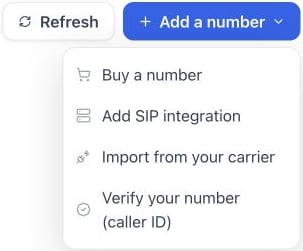
Settings → Phone numbers → Add a number: buy a number, add a SIP integration, import from your carrier or verify your own outbound caller ID.
Buy a marketplace number for a new setup. Bring your own SIP trunk when you already have carrier numbers you want to keep using — or let carrier import wire them up automatically if those numbers live at Twilio, Telnyx, or Vonage. Verify a caller ID when you only need your own number to show up on outbound calls — for example, an outbound sales campaign that doesn’t need to receive calls.
Want the line you already answer today to reach an assistant instead? Keep that number where it is and forward it to your Famulor number.
Choose the right registration
The available registration types depend on the country and number type. German local and mobile numbers currently support business registration only; individual registration is unavailable. The form only offers supported options. Use the exact legal name, registration number, and address shown on your supporting document. Registered companies should provide a commercial register extract; freelance businesses can use the accepted official tax-registration notice. API and MCP clients can retrieve the same fields and document requirements withGET /phone-numbers/verifications/requirements or get_number_verification_requirements. First consult the verification catalog for supported combinations. An unavailable registration type cannot be submitted.