

Your workspace plan can include Pipeline, Realtime, Half-Cascade, and Translate independently. Locked modes remain visible in the assistant editor and link to the Plan page. These controls apply when a voice call or Translate room starts; text-only messaging continues through the assistant’s text conversation path.
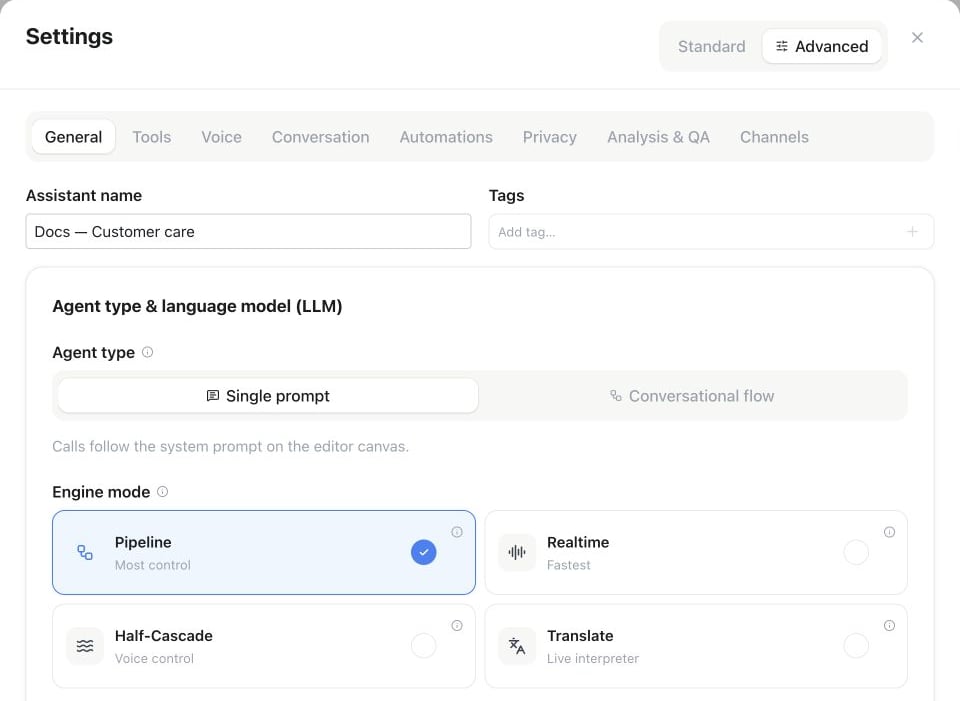
Assistant Settings → Advanced → General → Engine mode: select Pipeline, Realtime, Half-Cascade or Translate.
Pipeline (default)
Classic three-stage architecture: speech-to-text → LLM → text-to-speech. Choose each stage from the models available to your workspace.- Full control: pick STT, LLM, and TTS independently, including fallback chains per stage.
- Widest model and voice selection, best multilingual coverage.
- Turn detection via a semantic turn model or voice-activity detection (configurable).
Realtime
A single speech-to-speech model listens and speaks directly — no separate STT or TTS.- Lowest latency and very natural prosody (laughter, hesitation, tone).
- Voice selection comes from the realtime model.
- Turn detection can be robust, semantic, or adaptive when the selected voice mode supports it. Other voice modes manage turn timing automatically.
- Fewer knobs: voice library and per-stage fallbacks do not apply.
Full Duplex (Beta)
Under Realtime, choose Standard or Full Duplex (Beta) when it is available for your workspace. Full Duplex listens while speaking and manages its own conversational turns. Existing assistants keep Standard until you explicitly change the selection. Region availability: Full Duplex follows the models enabled for your selected workspace region, including EU, US and Global. It requires Beta access, Realtime plan access and compatible speech and reasoning models. The editor, API and MCP use the same availability rules. Choose a compatible conversation voice. Full Duplex uses it for conversation, greetings, consent and tool announcements. Ordinary announcements may be rephrased. Required consent is prepared with that voice, checked and played in full before consent can be accepted; if preparation or playback fails, the call ends. Uploaded greeting audio keeps its recorded voice. The Fallback voice in settings is retained for a conversation that needs to fall back to Pipeline. The reasoning model is managed centrally. Turn-detection and response-eagerness controls do not apply to Full Duplex. Test your languages, interruptions and tool workflows before customer calls. Image and video understanding are unavailable in this variant. The money icon shows the extra credits per minute. Full Duplex adds a charge for its active connection time, including pauses. AI Avatar has its own surcharge while the avatar is active; both apply when used together. Current workspace rates appear on Usage, and call history shows the charged portions. Prices are fixed when the call starts. Output text filters and blocked topics cannot filter native speech. Clear those filters explicitly before choosing Full Duplex, or keep Standard. Input protection and escalation rules remain available. A transfer to a Full Duplex assistant requires a call that originally started with Full Duplex. For Full Duplex prompts, keep the role, spoken language and conversational style clear and concise. Avoid contradictory turn-taking rules. Use the built-in consent setting for required consent wording, or upload a recording for a greeting that must be verbatim; ordinary greetings and tool announcements may be rephrased. A spoken interruption does not confirm that a running task was canceled.Half-cascade
A hybrid: a realtime model does the listening and thinking (text-only), while a separate TTS voice does the speaking. Half-cascade has its own text-capable realtime model selection, independent of the full realtime selection. Changing it never changes the separate TTS voice.- Realtime-grade understanding and turn taking, combined with your chosen TTS voice — including cloned or brand voices.
- Output voice is configured exactly like in pipeline mode.
Translate
A live interpreter for two people. The host chooses both languages and voices, then each speaker joins on the web or by phone. Each person hears the other speaker in their own language. A private guest invitation does not require an account. Translate keeps prompt, flow, tool, knowledge, and memory settings stored for other modes, but does not execute them. See Translate for room setup, invitations, phone participation, voices, and usage.Realtime turn detection
For compatible realtime and half-cascade assistants, choose how the assistant decides that the caller has finished speaking:- Robust (VAD) — responds after a clear pause. Fast and predictable.
- Semantic — waits until the caller seems to have completed their thought, even with a mid-sentence pause. Response eagerness controls how soon it answers.
- Adaptive — short acknowledgements such as “mhm” or “okay” do not stop the assistant, while a clear interruption lets the caller take over. You can also tune minimum silence, voice sensitivity, interruption duration, or disable interruptions.
Reliability behavior
If the selected realtime or half-cascade setup is temporarily unavailable, the assistant uses a compatible fallback when possible so the live call can continue.
Quick comparison
Troubleshooting
Losing context mid-call
The assistant asks for information already given, or seems to miss something said earlier. This is a comprehension issue, not an engine-mode dial. Keep the facts it needs in the knowledge base rather than only in the prompt, and in a flow, usecollect nodes so captured answers become call variables the rest of the flow can reference instead of asking again. If your plan lets you pick the language model yourself, a stronger one also holds a long conversation together more reliably.