

call.completed POST with:
- Transcript
- Duration
- Resolved input variables
- Post-call analysis (and AI QA scorecard when enabled)
- Failure guidance when an outbound call did not connect
failure object explains what happened, whether retrying may help, and what action to take. The same customer-facing guidance is available through REST and MCP call reads.
Watch the walkthrough
The English interface uses isolated example data. Changes and results in this walkthrough are demonstrations.Webhook settings
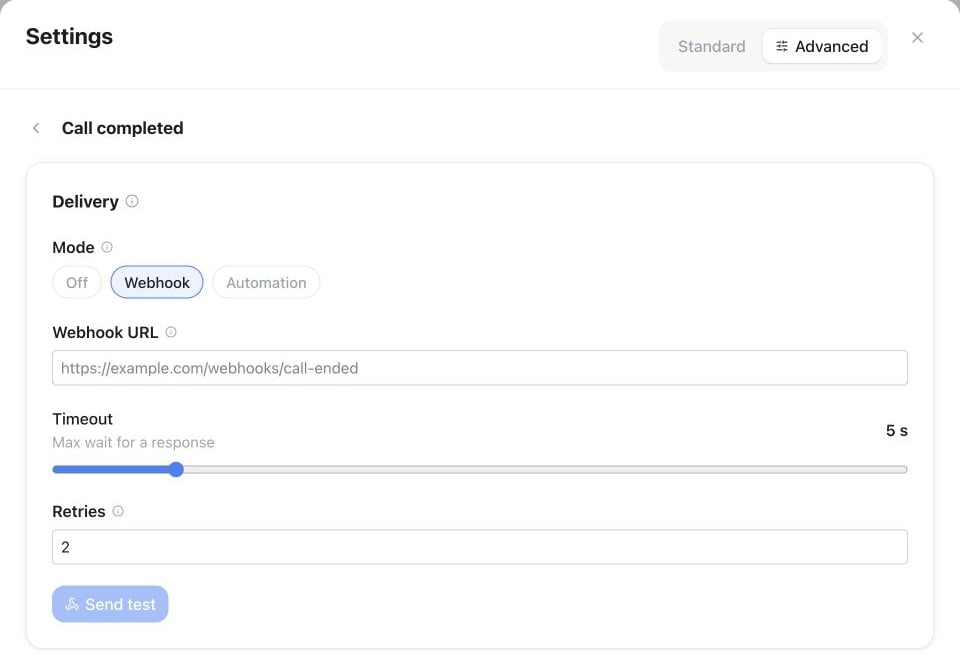
Assistant Settings → Automations → Call completed: choose Webhook, enter the Webhook URL and review Timeout and Retries before using Send test.
Use Test in the editor to send an example payload to an unsaved or saved URL (respects the timeout slider).
This URL is unsigned and applies to this assistant only. To receive
call.completed for every assistant at one receiver, add a signed webhook subscription through the API, MCP, CLI, SDK or n8n. Famulor signs those deliveries with HMAC-SHA256 in the X-Famulor-Signature header. Filter on data.assistant_id to tell the assistants apart.
Example webhook payload
Acall.completed delivery looks like this:
variables and input_variables follow the same call variables used elsewhere on the assistant. analysis and qa_scorecard are only populated once post-call processing finishes. When an outbound call didn’t connect, a failure object is added alongside the result — see above.
Transcript items are in conversation order: every line, tool call and tool result is listed at the moment it started, and when the caller speaks while the assistant is talking, whatever started first comes first. Typed chats keep the order the messages were sent. timeline_seq is an item’s position in that list and started_at its start time in Unix seconds. The transcript carries order_version: 2 to say so. A re-sent webhook puts an older call into the same order.
QA scorecard in the payload
When the assistant has AI QA scorecards on,qa_scorecard carries the result. Check status before you use the score:
scored—score(0–100) andpassedare set.not_scorable— there was nothing to judge.reasonisno_caller_speech,not_connected,no_caller_transcriptorno_applicable_criteria.judge_unavailable— the QA judge failed or returned no usable result.reasonistimeout,invalid_response(the judge answered, but without a usable score) orunavailable.
score and passed are null, and the call counts neither as passed nor as failed. Each entry in criteria has its own status (scored, not_applicable, unscored or unavailable) and a score only when it was scored. If an automation branches on passed, treat null as “no result”, not as a failure.
A call in which the caller never spoke looks like this:
API & MCP
UsePATCH /api/v1/assistants/{id} or the MCP update_assistant tool. Delivery can be off, the assistant webhook URL, or a bound automation. See the API schema for the current field contract.