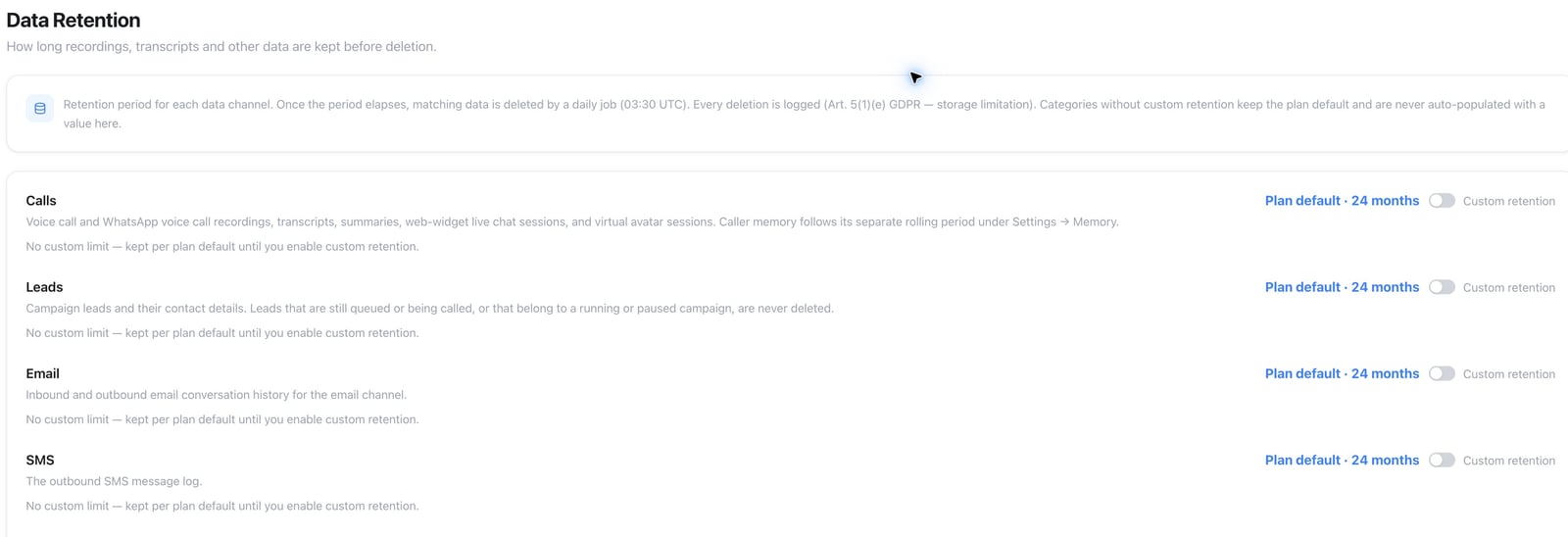
Control how long each workspace data channel is kept.
Data retention controls how long your workspace keeps calls, recordings,
transcripts, messages, and campaign leads before they are deleted
automatically. It is available under Settings → Data Retention when the
workspace plan includes the Data Retention feature. If the feature is not
included, the page links to Settings → Plan for an upgrade.At 0 days, Famulor starts deleting calls after billing, recording, webhooks and post-call automations finish. Keep any category-specific period where you need to retain that data. Other categories that inherit 0 days enter regular cleanup as soon as they are eligible. Contact our Enterprise team to set up a 0-day plan. See the Trust Center for ZDR on model requests.
Default and channel overrides
The plan default is 24 months (720 days) unless the governing plan defines
a different period. Leaving a channel without a custom value keeps that plan
default; the workspace is not silently populated with an override.
Data Retention — choose retention periods
Workspace owners and admins can set a retention period for:
calls, including voice, AI avatar, live chat and WhatsApp voice history;
call recordings, transcripts, summaries and caller-memory data;
campaign leads;
email threads and the outbound SMS log;
Telegram, Slack, Messenger, Microsoft Teams, Discord, Google Chat, X and
WhatsApp conversations, messages and stored media.
Active campaign leads are protected. Email retention evaluates the last
activity of the entire thread, so an old root message with a recent reply is
not deleted.Automation runs have no setting of their own. A run can copy data from any
channel, so its trigger data, step inputs and outputs, and error messages are
removed after the shortest period set here. The run itself stays in the run
history with its status, timing and credits, and can no longer be replayed.
Runs that are still queued or running keep their data until they finish.
Which plan applies?
A workspace on the main platform follows its platform plan. A customer
workspace created through a white-label reseller follows the plan in that
reseller’s catalog. The same rule applies to free-account defaults and
retention limits.
Deletion and audit trail
Expired data is removed automatically. Deletions are recorded in an audit trail to support your retention and compliance reviews — see Trust Center for the platform’s broader data-protection commitments. If configurable retention is not included in the plan, workspace-specific cleanup settings do not apply.History, the public API (GET /api/v1/calls, GET /api/v1/calls/{id}, GET /api/v1/calls/{id}/recording), and MCP (list_calls, get_call) can read a call and its recording. They do not delete a single call on demand. To keep call data for a shorter time, shorten the calls retention period.
Legal basis
This section is general information, not legal advice. Confirm applicable retention rules with legal counsel for your industry and jurisdiction.
Automatic deletion supports the GDPR’s storage-limitation principle (Art. 5(1)(e)): personal data should not be kept longer than necessary for the purpose it was collected for. The right to erasure (Art. 17) and the record of processing activities (Art. 30) that many businesses must maintain both depend on knowing — and being able to show — how long each type of data is actually kept.
A shorter deletion window is not always safer. Statutory retention minimums — commercial records, tax-relevant documents, medical records, and personnel files, among others — can require keeping specific data for years even after your normal retention period would delete it. Check whether any of your call or message content falls under such an obligation before shortening a retention period, and route anything that does through your own archiving process outside Famulor.
API and MCP
GET /api/v1/settings/retention reads the current default, channel settings, and allowed range.
PATCH /api/v1/settings/retention updates one or more channel values. Send
null to clear an override and restore the plan default.
MCP tools: get_retention_settings and update_retention_settings.
REST uses settings:read / settings:write; MCP also accepts the matching
assistant read/write scopes.