> ## Documentation Index
> Fetch the complete documentation index at: https://docs.famulor.io/llms.txt
> Use this file to discover all available pages before exploring further.
# Tools and scopes
> The full MCP tool catalog, how to scope it, and the read-only public profile
Once a client is connected (see [Connect an AI client](/mcp/overview)), plain language reaches every tool it's approved for. This page covers the full catalog, how to narrow it, and what happens with long-running or failed operations.
## Tool groups
The catalog is organized into 14 groups. Custom connections use the plain MCP endpoint by default; OAuth consent determines the approved groups. Selecting every group no longer silently reduces the selection. See [Connect an AI client](/mcp/overview).
| Group | Customer-facing capabilities |
| - | - |
| `assistants` | Assistants, versions, models, voices, reusable tools, bookings, and simulations |
| `calls` | Calls, conversation history, transcripts, and permitted call actions |
| `campaigns` | Campaigns, audiences, leads, suppression, and CRM sync |
| `messaging` | Messaging and email connectors, templates, and conversations |
| `telephony` | Phone numbers, SIP trunks, your own carrier connections and BYOC import, caller-ID and number verification, and the full Famulor Loop system — presence, ring groups, queues, routing rules, devices, and Recall |
| `knowledge` | Knowledge bases, documents, website imports, and connected file sources |
| `dashboards` | Analytics dashboards and widgets |
| `automations` | Automations, connections, Milian Missions, and run history |
| `billing` | Balance, usage, transactions, referrals, and outbound limits |
| `settings` | Workspace settings, domains, API keys, and retention |
| `platform` | White-label customer management for authorised resellers |
| `migration` | Preview and import Famulor 1.0 resources or inactive assistant shells from Retell AI, Vapi, Synthflow, and ElevenAgents |
| `tasks` | Long-running exports, crawls, simulations, and campaign preparation |
| `milian` | Paid questions, answers and analysis through `ask_milian`; explicit approval of additional credits before every question — [Ask Milian](/api-reference/milian) |
The MCP client receives the current input schema, permissions, and safety hints for every tool it is allowed to use. This live discovery is the authoritative reference for individual tool arguments.
Model catalog access and selected model names require **Fallbacks & Guardrails** in the active workspace, in addition to the tool scope. Whitelabel access alone does not grant this permission. Ordinary assistant and call responses omit internal model identities; voice selection and language controls remain available.
## Choosing which tools to expose
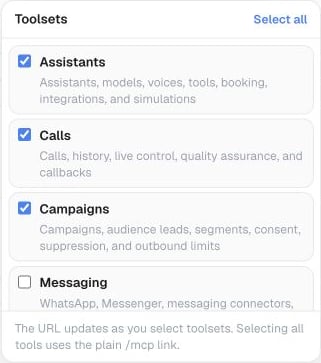 Select one or more groups when connecting:
```text theme={null}
https://app.famulor.io/mcp?toolsets=assistants,calls
```
You can also send `X-MCP-Toolsets: assistants,calls`. The header takes precedence over the query parameter. In a custom connection, use `list_mcp_toolsets` to see the groups available to your account — it remains available regardless of which groups you've selected. The public directory profile does not expose this tool.
Filtering is optional. A custom OAuth connection can use all explicitly approved groups with the plain `/mcp` URL. A filter can narrow its saved grant, but cannot add permissions. Workspace API keys retain their existing scope and role checks.
## Public directory profile
The [official Famulor plugin for ChatGPT](https://chatgpt.com/plugins/plugin_asdk_app_6a8a46791ed08191a79aa4c98f34d772) and the reviewed Claude directory connection use this read-only profile:
```text theme={null}
https://app.famulor.io/mcp?profile=assistant-history
```
This profile is limited to read-only assistant information and read-only conversation history. It excludes assistant changes, outbound calls, campaigns, messaging, phone-number management, billing, integrations, and tool-group discovery. Custom MCP connections keep the permissions selected during their own setup.
To create and edit assistant configurations, use the separate opt-in URL `https://app.famulor.io/mcp?profile=assistant-management`. It offers the 11 read tools plus `create_assistant` and `update_assistant` and requests `assistants:read`, `assistants:write`, and `calls:read`. It cannot place calls, send messages, manage phone numbers, or delete assistants. This profile is separate from the reviewed read-only directory listing.
## Long-running tasks
Website imports, simulations, history exports, and large campaign preparations may continue as MCP tasks. A compatible client can show progress, retrieve the result, or request cancellation. Cancellation stops remaining work when possible; an action already accepted by an external service may still complete.
Exports use short-lived private download links. Tasks and their results remain limited to the workspace and credential that created them.
Call-history tools return a provider-neutral `failure` object when a call cannot complete. Use its code, customer-safe message, retry guidance, and suggested action instead of relying on infrastructure-specific details.
## Errors
| Status | Meaning |
| - | - |
| `401` | The token is missing or invalid; reconnect the client |
| `403` | The plan, role, or approved scopes do not allow the requested action |
| `405` | Send MCP requests with `POST` |
| `429` | Too many requests; wait and retry — see [Rate limits](/mcp/overview#rate-limits) |
This documentation is built and hosted on [Mintlify](https://mintlify.com), a developer documentation platform.
Select one or more groups when connecting:
```text theme={null}
https://app.famulor.io/mcp?toolsets=assistants,calls
```
You can also send `X-MCP-Toolsets: assistants,calls`. The header takes precedence over the query parameter. In a custom connection, use `list_mcp_toolsets` to see the groups available to your account — it remains available regardless of which groups you've selected. The public directory profile does not expose this tool.
Filtering is optional. A custom OAuth connection can use all explicitly approved groups with the plain `/mcp` URL. A filter can narrow its saved grant, but cannot add permissions. Workspace API keys retain their existing scope and role checks.
## Public directory profile
The [official Famulor plugin for ChatGPT](https://chatgpt.com/plugins/plugin_asdk_app_6a8a46791ed08191a79aa4c98f34d772) and the reviewed Claude directory connection use this read-only profile:
```text theme={null}
https://app.famulor.io/mcp?profile=assistant-history
```
This profile is limited to read-only assistant information and read-only conversation history. It excludes assistant changes, outbound calls, campaigns, messaging, phone-number management, billing, integrations, and tool-group discovery. Custom MCP connections keep the permissions selected during their own setup.
To create and edit assistant configurations, use the separate opt-in URL `https://app.famulor.io/mcp?profile=assistant-management`. It offers the 11 read tools plus `create_assistant` and `update_assistant` and requests `assistants:read`, `assistants:write`, and `calls:read`. It cannot place calls, send messages, manage phone numbers, or delete assistants. This profile is separate from the reviewed read-only directory listing.
## Long-running tasks
Website imports, simulations, history exports, and large campaign preparations may continue as MCP tasks. A compatible client can show progress, retrieve the result, or request cancellation. Cancellation stops remaining work when possible; an action already accepted by an external service may still complete.
Exports use short-lived private download links. Tasks and their results remain limited to the workspace and credential that created them.
Call-history tools return a provider-neutral `failure` object when a call cannot complete. Use its code, customer-safe message, retry guidance, and suggested action instead of relying on infrastructure-specific details.
## Errors
| Status | Meaning |
| - | - |
| `401` | The token is missing or invalid; reconnect the client |
| `403` | The plan, role, or approved scopes do not allow the requested action |
| `405` | Send MCP requests with `POST` |
| `429` | Too many requests; wait and retry — see [Rate limits](/mcp/overview#rate-limits) |
This documentation is built and hosted on [Mintlify](https://mintlify.com), a developer documentation platform.