> ## Documentation Index
> Fetch the complete documentation index at: https://docs.famulor.io/llms.txt
> Use this file to discover all available pages before exploring further.
# Flow node reference
> Every node type in the flow builder, with its fields and behavior
This is the field-level reference for the flow builder — every node type, its fields, and how it behaves during a call. For what a flow is and how edges and labels work, start with the [flow builder overview](/flow-builder/overview).
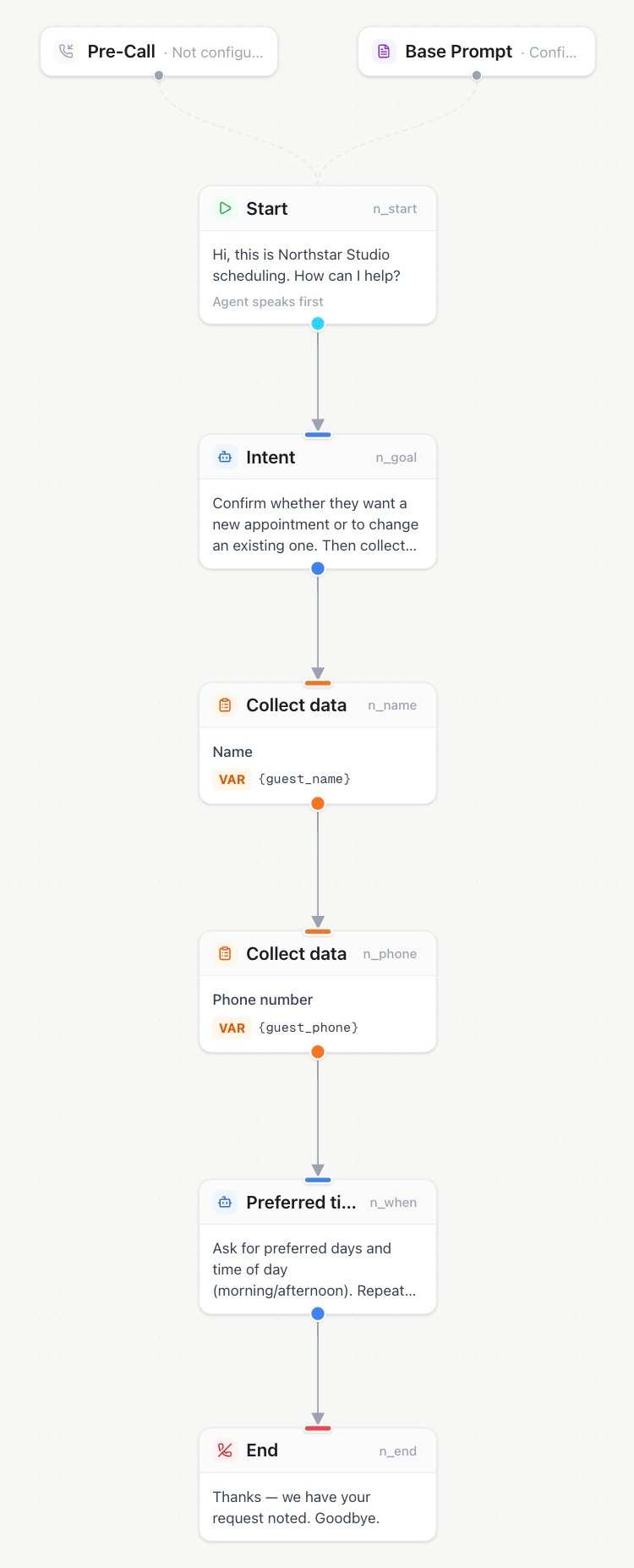 ## Start
Entry point of every flow. Defines the **greeting** and the **greeting mode**:
* `agent speaks first` — the greeting is spoken as soon as the call connects (typical inbound).
* `user speaks first` — the assistant waits for the caller (typical outbound: the callee says "Hello?" first).
## Agent
A conversational agent with its own **name**, **instructions**, and optional **voice override**. The conversation stays with this agent until it hands off along one of its outgoing edges.
* Each outgoing edge is a possible handoff; the assistant uses its label to decide. See [why labels matter](/flow-builder/overview#why-edge-and-agent-labels-matter).
* Empty instructions use the assistant's system prompt (Advanced prompt) as the base; node text is **appended**, not replaced.
* Voice override lets different agents speak with different voices.
## Condition
A forced decision point. You write a **description** of what is being decided; the assistant must choose exactly one outgoing edge based on the edge labels. Use it when routing must happen immediately.
## Tool
Runs a reusable **API or built-in tool** during the conversation and gives the result back to the assistant. The node only selects the tool: its endpoint, credentials, description, timeout, and voice behavior are managed once on the [Tools page](/assistants/agent-tools) and apply wherever the tool is used.
| Field | Purpose |
| - | - |
| **Central tool** | The API or built-in tool that runs at this step |
| **Force tool call** | The assistant must call the tool at this step instead of replying with text |
Turn on **Force tool call** only when this step must always run the tool. Make sure every required input is already known, and add an error or fallback path for this node.
For long-running webhooks such as CRM writes or availability checks, turn on **Talk While Waiting** for the tool on the Tools page. The assistant announces the request with a short phrase, and the conversation continues while it runs. See [waiting behavior](/assistants/agent-tools#waiting-behavior).
With secondary languages configured, saved tool announcements use the text as guidance in the caller’s current supported language. See [filler phrases and async tools](/assistants/conversation-quality#filler-phrases--async-tools).
## Transfer (blind)
Immediately transfers the call to a **phone number or SIP URI** (SIP REFER), optionally after a short **announcement**. The assistant leaves the call; there is no briefing of the receiving person.
## Warm transfer
The premium handover: the caller is put on **hold music**, the assistant dials the target (an employee), **briefs them with an AI-generated summary** of the conversation so far, and only then connects both parties. The employee can accept or decline; voicemail at the target is detected.
| Field | Purpose |
| - | - |
| **Target** | A Famulor Loop user, extension, ring group, or queue — or an external number in E.164 format or as a `sip:` URI. You can also let the assistant determine the number during the call |
| **Outbound phone number** | The number used to call the target (it needs an outbound trunk) |
| **Hold message** | What the caller hears before being put on hold |
| **Connected message** | What the caller hears once the target is on the line |
| **DTMF tones after answer** | Optional sequence under **Advanced** on the warm-transfer tool. Up to 32 characters: `0–9`, `*`, `#`, `A–D`, and `w` (a half-second pause). Sent to the target after its line answers, before the briefing. |
| **Briefing initial message** | The first thing the assistant says to the target |
| **Summary instructions** | How the assistant summarizes the conversation for the target |
| **Share supervisor conversation with the AI** | After a failed transfer, lets the AI use relevant supervisor consultation notes in the current call. The consultation remains in the call record regardless |
| **Ringing timeout** | How long to ring the target (5–120 seconds; default 30) |
| **Hold music** | Whether to play hold music, and which available track to use |
| **Fallback** | Continue the conversation, end the call, or make a blind transfer if the target does not answer or declines |
**Opening and approval:** The assistant waits for the supervisor to speak before its initial message. If the briefing initial message is empty and summary instructions are configured, those instructions control the opening. A generic introduction is used only when both are empty. Agreeing to hear a briefing does not approve connecting the call: the assistant must finish the caller summary and ask for permission to connect, then receive a new affirmative reply. An interrupted briefing must be completed before connecting.
For example, `wwww1234#wwww` waits two seconds, dials extension 1234 followed by #, then waits another two seconds before the briefing. These are fixed pauses: the sequence cannot detect when a phone menu or extension is ready. Leave it empty for direct numbers, or use a direct extension through Custom SIP when available. In a flow, configure this on the assigned warm-transfer tool in **Tools**.
Warm transfer outcomes (`started` / `completed` / `failed`) are recorded as call events. After failure, the AI always receives the provider-neutral failure status. It receives supervisor notes only when sharing is enabled and the supervisor actually spoke.
## Collect
Structured data capture with **built-in validation, re-asking, and confirmation** — far more reliable than hoping the LLM transcribes an email address correctly.
* **Types:** `name`, `email`, `phone`, `address`, `date of birth`, `dtmf` (digits via keypad or spoken aloud), `credit_card` (payment card).
* **Variable** (required): the result is stored under this name and included in the `call.completed` webhook.
* **Prompt**: optional extra instructions on top of the built-in dialogue.
* **Max attempts** (default 3): after final failure, the flow takes the edge labeled `failed` if present.
* **Input length** (`dtmf`): choose an exact length or collection until the stop key. **DTMF digits** is the exact count or maximum (1–32); **Minimum digits** applies to stop-key mode. Existing nodes stay exact unless changed.
* **Timeout and stop key** (assigned **Collect Keypad Input** tool): one total deadline of 5–120 seconds and submit key `#` or `*`. Exact mode needs the fixed count; stop-key mode accepts submission after the minimum or finishes at the maximum. The stop key is not included in the result. Default: 30 seconds, including the prompt; saved timeouts stay unchanged.
* **Payment card:** requires the **Collect payment card** tool and an eligible connected Stripe account. During the call, payment details are collected securely. Only a reusable payment-method reference and non-sensitive display details are retained; the full card number and security code are never stored. Connect Stripe under **Tools → Agent Connectors** first.
## DTMF
Sends a sequence of **keypad tones from the assistant** to navigate an external IVR or phone menu. Assign a **DTMF Input** tool and configure the tones on the Tools page (`0–9`, `*`, `#`, or `A–D`, up to 32 characters). A flow node needs a configured sequence; after sending it, the flow follows the outgoing edge.
Match the sequence expected by the external menu, including `*` or `#` where required. If the IVR must respond between groups of tones, use separate Send DTMF nodes. To receive a PIN, account number, or menu choice from the caller, use a **Collect** node with type **Keypad or spoken digits** and assign **Collect Keypad Input** instead.
## End
Terminates the call, optionally speaking a **farewell** first. Always give your flows explicit endings — it produces clean call statuses and prevents the conversation from drifting after its job is done.
With secondary languages configured, a saved farewell guides a message in the caller’s current supported language. Without secondary languages, it keeps its existing delivery behavior. An empty Flow farewell lets the assistant generate a brief goodbye if none was just spoken; unlike the built-in **End call** tool, it is not a silent-hangup setting.
## Central Tool Library
**Add node** opens a searchable Tool Library. Reusable settings remain managed on the Tools page:
| Registry tool | Flow placement |
| - | - |
| API | Generic **Tool** node |
| Call transfer | Dedicated **Transfer** node |
| Warm transfer | Dedicated **Warm transfer** node |
| DTMF Input | Dedicated **Send DTMF** node |
| Collect Keypad Input | Dedicated **Collect** node |
| Other built-ins | Generic referenced **Tool** node |
| MCP server | Assistant-wide assignment only; it is not one deterministic flow action |
Use **Edit in Tools** to change reusable settings. The change applies to every assistant and flow that uses the tool.
Tool, transfer, warm-transfer, Send DTMF, and keypad-collection nodes select a reusable tool from the Tools page. If a selected tool becomes unavailable, the node follows its configured path and the call details show the issue.
This documentation is built and hosted on [Mintlify](https://mintlify.com), a developer documentation platform.
## Start
Entry point of every flow. Defines the **greeting** and the **greeting mode**:
* `agent speaks first` — the greeting is spoken as soon as the call connects (typical inbound).
* `user speaks first` — the assistant waits for the caller (typical outbound: the callee says "Hello?" first).
## Agent
A conversational agent with its own **name**, **instructions**, and optional **voice override**. The conversation stays with this agent until it hands off along one of its outgoing edges.
* Each outgoing edge is a possible handoff; the assistant uses its label to decide. See [why labels matter](/flow-builder/overview#why-edge-and-agent-labels-matter).
* Empty instructions use the assistant's system prompt (Advanced prompt) as the base; node text is **appended**, not replaced.
* Voice override lets different agents speak with different voices.
## Condition
A forced decision point. You write a **description** of what is being decided; the assistant must choose exactly one outgoing edge based on the edge labels. Use it when routing must happen immediately.
## Tool
Runs a reusable **API or built-in tool** during the conversation and gives the result back to the assistant. The node only selects the tool: its endpoint, credentials, description, timeout, and voice behavior are managed once on the [Tools page](/assistants/agent-tools) and apply wherever the tool is used.
| Field | Purpose |
| - | - |
| **Central tool** | The API or built-in tool that runs at this step |
| **Force tool call** | The assistant must call the tool at this step instead of replying with text |
Turn on **Force tool call** only when this step must always run the tool. Make sure every required input is already known, and add an error or fallback path for this node.
For long-running webhooks such as CRM writes or availability checks, turn on **Talk While Waiting** for the tool on the Tools page. The assistant announces the request with a short phrase, and the conversation continues while it runs. See [waiting behavior](/assistants/agent-tools#waiting-behavior).
With secondary languages configured, saved tool announcements use the text as guidance in the caller’s current supported language. See [filler phrases and async tools](/assistants/conversation-quality#filler-phrases--async-tools).
## Transfer (blind)
Immediately transfers the call to a **phone number or SIP URI** (SIP REFER), optionally after a short **announcement**. The assistant leaves the call; there is no briefing of the receiving person.
## Warm transfer
The premium handover: the caller is put on **hold music**, the assistant dials the target (an employee), **briefs them with an AI-generated summary** of the conversation so far, and only then connects both parties. The employee can accept or decline; voicemail at the target is detected.
| Field | Purpose |
| - | - |
| **Target** | A Famulor Loop user, extension, ring group, or queue — or an external number in E.164 format or as a `sip:` URI. You can also let the assistant determine the number during the call |
| **Outbound phone number** | The number used to call the target (it needs an outbound trunk) |
| **Hold message** | What the caller hears before being put on hold |
| **Connected message** | What the caller hears once the target is on the line |
| **DTMF tones after answer** | Optional sequence under **Advanced** on the warm-transfer tool. Up to 32 characters: `0–9`, `*`, `#`, `A–D`, and `w` (a half-second pause). Sent to the target after its line answers, before the briefing. |
| **Briefing initial message** | The first thing the assistant says to the target |
| **Summary instructions** | How the assistant summarizes the conversation for the target |
| **Share supervisor conversation with the AI** | After a failed transfer, lets the AI use relevant supervisor consultation notes in the current call. The consultation remains in the call record regardless |
| **Ringing timeout** | How long to ring the target (5–120 seconds; default 30) |
| **Hold music** | Whether to play hold music, and which available track to use |
| **Fallback** | Continue the conversation, end the call, or make a blind transfer if the target does not answer or declines |
**Opening and approval:** The assistant waits for the supervisor to speak before its initial message. If the briefing initial message is empty and summary instructions are configured, those instructions control the opening. A generic introduction is used only when both are empty. Agreeing to hear a briefing does not approve connecting the call: the assistant must finish the caller summary and ask for permission to connect, then receive a new affirmative reply. An interrupted briefing must be completed before connecting.
For example, `wwww1234#wwww` waits two seconds, dials extension 1234 followed by #, then waits another two seconds before the briefing. These are fixed pauses: the sequence cannot detect when a phone menu or extension is ready. Leave it empty for direct numbers, or use a direct extension through Custom SIP when available. In a flow, configure this on the assigned warm-transfer tool in **Tools**.
Warm transfer outcomes (`started` / `completed` / `failed`) are recorded as call events. After failure, the AI always receives the provider-neutral failure status. It receives supervisor notes only when sharing is enabled and the supervisor actually spoke.
## Collect
Structured data capture with **built-in validation, re-asking, and confirmation** — far more reliable than hoping the LLM transcribes an email address correctly.
* **Types:** `name`, `email`, `phone`, `address`, `date of birth`, `dtmf` (digits via keypad or spoken aloud), `credit_card` (payment card).
* **Variable** (required): the result is stored under this name and included in the `call.completed` webhook.
* **Prompt**: optional extra instructions on top of the built-in dialogue.
* **Max attempts** (default 3): after final failure, the flow takes the edge labeled `failed` if present.
* **Input length** (`dtmf`): choose an exact length or collection until the stop key. **DTMF digits** is the exact count or maximum (1–32); **Minimum digits** applies to stop-key mode. Existing nodes stay exact unless changed.
* **Timeout and stop key** (assigned **Collect Keypad Input** tool): one total deadline of 5–120 seconds and submit key `#` or `*`. Exact mode needs the fixed count; stop-key mode accepts submission after the minimum or finishes at the maximum. The stop key is not included in the result. Default: 30 seconds, including the prompt; saved timeouts stay unchanged.
* **Payment card:** requires the **Collect payment card** tool and an eligible connected Stripe account. During the call, payment details are collected securely. Only a reusable payment-method reference and non-sensitive display details are retained; the full card number and security code are never stored. Connect Stripe under **Tools → Agent Connectors** first.
## DTMF
Sends a sequence of **keypad tones from the assistant** to navigate an external IVR or phone menu. Assign a **DTMF Input** tool and configure the tones on the Tools page (`0–9`, `*`, `#`, or `A–D`, up to 32 characters). A flow node needs a configured sequence; after sending it, the flow follows the outgoing edge.
Match the sequence expected by the external menu, including `*` or `#` where required. If the IVR must respond between groups of tones, use separate Send DTMF nodes. To receive a PIN, account number, or menu choice from the caller, use a **Collect** node with type **Keypad or spoken digits** and assign **Collect Keypad Input** instead.
## End
Terminates the call, optionally speaking a **farewell** first. Always give your flows explicit endings — it produces clean call statuses and prevents the conversation from drifting after its job is done.
With secondary languages configured, a saved farewell guides a message in the caller’s current supported language. Without secondary languages, it keeps its existing delivery behavior. An empty Flow farewell lets the assistant generate a brief goodbye if none was just spoken; unlike the built-in **End call** tool, it is not a silent-hangup setting.
## Central Tool Library
**Add node** opens a searchable Tool Library. Reusable settings remain managed on the Tools page:
| Registry tool | Flow placement |
| - | - |
| API | Generic **Tool** node |
| Call transfer | Dedicated **Transfer** node |
| Warm transfer | Dedicated **Warm transfer** node |
| DTMF Input | Dedicated **Send DTMF** node |
| Collect Keypad Input | Dedicated **Collect** node |
| Other built-ins | Generic referenced **Tool** node |
| MCP server | Assistant-wide assignment only; it is not one deterministic flow action |
Use **Edit in Tools** to change reusable settings. The change applies to every assistant and flow that uses the tool.
Tool, transfer, warm-transfer, Send DTMF, and keypad-collection nodes select a reusable tool from the Tools page. If a selected tool becomes unavailable, the node follows its configured path and the call details show the issue.
This documentation is built and hosted on [Mintlify](https://mintlify.com), a developer documentation platform.