> ## Documentation Index
> Fetch the complete documentation index at: https://docs.famulor.io/llms.txt
> Use this file to discover all available pages before exploring further.
# Custom variables
> Define per-assistant variables and inject live values — from the API, campaign leads, an inbound webhook, or system context — into prompts, greetings, and tools
Custom variables let you write an assistant once and personalize every call. Instead of hard-coding a name, an appointment, or an account number into the system prompt, you reference a placeholder like `{{customer_name}}` and supply the value per call — from your API request, a campaign lead, an inbound enrichment webhook, or the platform's built-in system context.
## Variable reference syntax
Reference a variable with double braces — the preferred, JSON-safe form:
```text theme={null}
Hi {{customer_name}}, I see your appointment is on {{appointment_date}}.
```
The legacy single-brace form `{customer_name}` is also resolved, but **only for keys that are actually known** (a defined or system variable). This keeps literal braces — for example JSON in a tool body — intact. Unknown single-brace text is left untouched; unknown double-brace placeholders become empty.
## Defining variables on an assistant
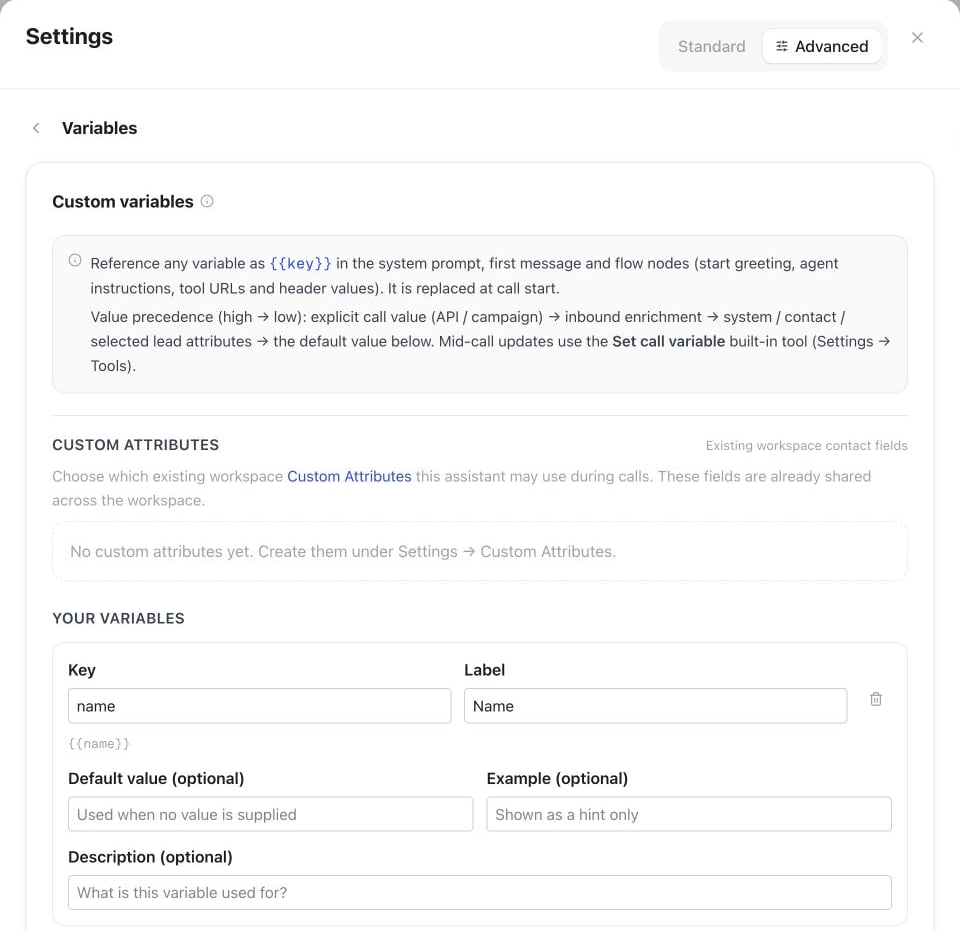 Each assistant carries a list of variable definitions. A definition has:
| Field | Required | Description |
| - | - | - |
| `key` | yes | The identifier used as `{{key}}`. Lowercase letter first, then lowercase letters, digits, and underscores; 1–64 characters (`^[a-z][a-z0-9_]{0,63}$`). Unique per assistant. Cannot be a reserved [system variable](#system-variables). |
| `label` | yes | Human-readable name shown in the editor. |
| `description` | no | Note on what the variable is for. |
| `default_value` | no | Fallback used when no value is supplied at call time. |
| `example` | no | Sample value (editor/docs only, never sent). |
| `source` | no | Value-source policy: `manual` (default), `lead`, `webhook`, or `system`. `lead` explicitly grants this assistant access to the same-key registered workspace Custom Attribute and is validated against the current catalog. `system` is reserved for supported built-in defaults. |
Keys are validated on save: invalid format, a collision with a reserved system variable, a duplicate key, or a missing label are all rejected.
## Where variables are substituted
Values are substituted at call start, before the model or flow runs, in these fields:
* Assistant **system prompt**
* Assistant **first message** (greeting)
* Flow node **`start.greeting`**
* Flow node **`agent.instructions`**
* Flow **tool node** request **URL** and header **values**
* [API tool](/api/tools-and-webhooks) request **URL**, header **values**, and **static parameter values** — substituted at the moment the tool runs
* Flow **transfer node** destination **number** and **announcement**
* Flow **warm transfer node** destination **number**, **caller announcement**, and **briefing instructions**
* **Built-in tool texts** — tool **description**, transfer **announcement**, warm-transfer **hold message**, **connected message**, **briefing first message**, **summary instructions**, end-call **farewell**, assistant-transfer **pre-transfer message**, and payment-collection **prompt**
API tools resolve variables when each request runs, including values collected during the conversation. Static number and boolean parameters keep their templates until that point. Use **Call variables** in the tool’s **Test request** section to supply sample values. Unresolved static/header placeholders become empty; unresolved endpoint URL placeholders remain unchanged.
So a transfer node can route each call to a per-lead number like `{{handover_number}}`, supplied via campaign lead fields, the API call's `variables`, or the inbound variable-webhook — and a warm-transfer briefing can open with `Hallo, hier {{assistant_name}} von {{company}} — Anrufer {{caller_name}}`. See the [Node reference](/flow-builder/nodes) for what each flow field controls.
Spoken tool texts are substituted twice: once at call start with the resolved input variables, and again at the moment the tool runs — so values collected **during** the conversation (via `set_variable` or collect steps) are included and take precedence.
When **Transfer to assistant** hands the call to another assistant, that assistant's system prompt, first message, flow texts and built-in tool texts are filled the same way, with the call's current values, including values collected so far. `{{assistant_name}}` then names the receiving assistant, and its own default values fill any variable the call has no value for. Missing keys may use the receiving assistant’s defaults; explicitly cleared values stay empty. Variables remain available even when no conversation messages are passed. API actions that save data externally must map returned values to call variables if later assistants should use them.
For example, a tool node can call `https://api.example.com/orders/{{order_id}}` or send `Authorization: Bearer {{api_token}}` with per-call values.
## Value sources & precedence
A value can arrive from several places. At call start the platform uses this precedence, highest first:
1. **Explicit** — values passed with the call, such as API `make-call` `variables`.
2. **Inbound variable-webhook** — enrichment fetched at call start (see [below](#inbound-variable-webhook)).
3. **Current contact and system values** — selected Custom Attributes and values filled by the platform from this call's context.
4. **Remembered caller variable** — the last consented value kept in the configured Shared or Private scope.
5. **Default** — the definition's `default_value`.
A double-brace placeholder with no value becomes an empty string. Unknown legacy single-brace text stays unchanged.
### Explicit values via the API
```bash theme={null}
curl -X POST https://app.famulor.io/api/v1/calls \
-H "Authorization: Bearer fam_..." \
-H "Content-Type: application/json" \
-d '{
"assistant_id": "asst_123",
"to_number": "+493012345678",
"variables": { "customer_name": "Jordan", "appointment_date": "2026-07-10" }
}'
```
Pass one-call tasks in `variables`, including values for Manual variables. Putting the same key in `lead` does not grant access to that contact field. This request does not edit the assistant or contact; retention follows each variable’s Caller memory setting. Values must be a flat object with lowercase snake\_case keys (up to 64 characters). Strings accept up to 2000 characters; numbers and booleans become text. Nested objects, arrays and null values are rejected. Control characters, invisible formatting and role-marker prefixes are removed before use.
After a call starts, use MCP `get_call` with `expected_variables`, or send `POST /api/v1/calls/{id}/verify-inputs` with `{ "expected_variables": { "auftrag": "Book a consultation" } }`. The read-only response reports only the requested keys: `matched`, `missing`, `different`, or `not_available`. A missing snapshot is not a failed or passed test; check again after the call starts. Matching inputs verifies delivery, not the scenario outcome. A capacity-queued MCP call retains its inputs.
Outbound calls also prefill call-only defaults and selected contact values before call-start enrichment; those prefilled values can take precedence over a later webhook. An explicit per-call value has the highest priority.
### Campaign leads → variables
In a [campaign](/campaigns/overview), each lead can include free-form **custom fields**. At dial time, a custom field is mapped onto a variable with the **same key**, so a CSV column becomes a variable:
```csv theme={null}
phone_number,name,company_name,appointment_date
+493012345678,Jordan,Northwind,2026-07-10
+491701234567,Alex,Contoso,2026-07-11
```
Here `company_name` and `appointment_date` populate `{{company_name}}` and `{{appointment_date}}` only after those fields exist as workspace Custom Attributes and are selected for this assistant. That selection creates a definition with `source: "lead"`; arbitrary or deleted lead fields are not exposed. Contact `name` is separate identity data and is available through the built-in `{{customer_name}}` system variable.
## System variables
These keys are always available at call start. They are reserved — you cannot define a custom variable with one of these keys.
| Key | Label | Description | Example |
| - | - | - | - |
| `caller_number` | Caller number | The phone number the call is coming from (inbound) / being placed to (outbound), E.164. | `+493012345678` |
| `called_number` | Called number | The number that was dialed / your number that received the call, E.164. | `+498998765432` |
| `assistant_name` | Assistant name | The name of the assistant handling the call. | `Reception Bot` |
| `direction` | Call direction | `inbound`, `outbound` or `web`. | `inbound` |
| `call_id` | Call ID | Unique identifier of this call. | `c_a1b2c3` |
| `date` | Date | Current date at call start (assistant timezone), `YYYY-MM-DD`. | `2026-07-05` |
| `time` | Time | Current time at call start (assistant timezone), `HH:MM`. | `14:30` |
| `datetime` | Date & time | Current date and time at call start (ISO 8601). | `2026-07-05T14:30:00Z` |
| `weekday` | Weekday | Current weekday at call start. | `Sunday` |
## Inbound variable-webhook
For **inbound** calls you often don't know the caller in advance. Configure a **variable webhook** on the assistant and Famulor calls it at call start to enrich variables — for example, to look up a customer by their caller number. This fires before the call starts; see [Post-call webhooks](/assistants/webhooks) for what Famulor sends after one ends.
### Request
Famulor sends a `POST` with a JSON body:
```json theme={null}
{
"event": "call.variables",
"assistant_id": "asst_123",
"call_id": "c_a1b2c3",
"direction": "inbound",
"from_number": "+493012345678",
"to_number": "+498998765432"
}
```
The raw request body is signed with HMAC-SHA256 using the webhook secret configured for the assistant. The signature is sent in this header:
```text theme={null}
X-Famulor-Signature: sha256=
```
### Response
Return the variables to merge:
```json theme={null}
{
"variables": {
"customer_name": "Jordan",
"open_amount": "128.50"
}
}
```
These values override system variables and defaults, but explicit values supplied for the call take precedence. If the lookup fails, the call continues with the values already available.
### Native automation (alternative)
Instead of a custom webhook, you can create an [**Automation**](/automations/overview) with the **Inject input variables** trigger and bind it to the assistant. Add a **Return variables** action using the same `{ variables: {…} }` response shape. If no matching automation is active, the configured webhook is used.
### Verifying the signature
```js Node.js theme={null}
import crypto from "node:crypto";
// rawBody: the exact bytes received, before JSON.parse
function verify(rawBody, signatureHeader, secret) {
const expected =
"sha256=" +
crypto.createHmac("sha256", secret).update(rawBody).digest("hex");
const a = Buffer.from(signatureHeader);
const b = Buffer.from(expected);
return a.length === b.length && crypto.timingSafeEqual(a, b);
}
```
```python Python theme={null}
import hmac, hashlib
# raw_body: the exact bytes received, before json.loads
def verify(raw_body: bytes, signature_header: str, secret: str) -> bool:
expected = "sha256=" + hmac.new(
secret.encode(), raw_body, hashlib.sha256
).hexdigest()
return hmac.compare_digest(expected, signature_header)
```
Always compute the HMAC over the **raw** request body bytes, not over a re-serialized object — re-serialization can change whitespace or key order and break the signature. Use a constant-time comparison.
### Example request
```bash theme={null}
curl -X POST https://your-app.example.com/famulor/variables \
-H "Content-Type: application/json" \
-H "X-Famulor-Signature: sha256=6d3a...e1f0" \
-d '{
"event": "call.variables",
"assistant_id": "asst_123",
"call_id": "c_a1b2c3",
"direction": "inbound",
"from_number": "+493012345678",
"to_number": "+498998765432"
}'
```
## API & MCP
* `GET /api/v1/assistants/{id}/variables` — read the assistant's variable definitions; scope `assistants:read`.
* `PATCH /api/v1/assistants/{id}/variables` — replace the variable definitions; scope `assistants:write`.
* MCP tools: `get_assistant_variables`, `set_assistant_variables`.
Full REST reference lives at [docs.famulor.io](https://docs.famulor.io). Use `{{key}}` everywhere you want a per-call value, keep keys `snake_case`, and give every variable a sensible `default_value` so calls degrade gracefully when a source is missing.
This documentation is built and hosted on [Mintlify](https://mintlify.com), a developer documentation platform.
Each assistant carries a list of variable definitions. A definition has:
| Field | Required | Description |
| - | - | - |
| `key` | yes | The identifier used as `{{key}}`. Lowercase letter first, then lowercase letters, digits, and underscores; 1–64 characters (`^[a-z][a-z0-9_]{0,63}$`). Unique per assistant. Cannot be a reserved [system variable](#system-variables). |
| `label` | yes | Human-readable name shown in the editor. |
| `description` | no | Note on what the variable is for. |
| `default_value` | no | Fallback used when no value is supplied at call time. |
| `example` | no | Sample value (editor/docs only, never sent). |
| `source` | no | Value-source policy: `manual` (default), `lead`, `webhook`, or `system`. `lead` explicitly grants this assistant access to the same-key registered workspace Custom Attribute and is validated against the current catalog. `system` is reserved for supported built-in defaults. |
Keys are validated on save: invalid format, a collision with a reserved system variable, a duplicate key, or a missing label are all rejected.
## Where variables are substituted
Values are substituted at call start, before the model or flow runs, in these fields:
* Assistant **system prompt**
* Assistant **first message** (greeting)
* Flow node **`start.greeting`**
* Flow node **`agent.instructions`**
* Flow **tool node** request **URL** and header **values**
* [API tool](/api/tools-and-webhooks) request **URL**, header **values**, and **static parameter values** — substituted at the moment the tool runs
* Flow **transfer node** destination **number** and **announcement**
* Flow **warm transfer node** destination **number**, **caller announcement**, and **briefing instructions**
* **Built-in tool texts** — tool **description**, transfer **announcement**, warm-transfer **hold message**, **connected message**, **briefing first message**, **summary instructions**, end-call **farewell**, assistant-transfer **pre-transfer message**, and payment-collection **prompt**
API tools resolve variables when each request runs, including values collected during the conversation. Static number and boolean parameters keep their templates until that point. Use **Call variables** in the tool’s **Test request** section to supply sample values. Unresolved static/header placeholders become empty; unresolved endpoint URL placeholders remain unchanged.
So a transfer node can route each call to a per-lead number like `{{handover_number}}`, supplied via campaign lead fields, the API call's `variables`, or the inbound variable-webhook — and a warm-transfer briefing can open with `Hallo, hier {{assistant_name}} von {{company}} — Anrufer {{caller_name}}`. See the [Node reference](/flow-builder/nodes) for what each flow field controls.
Spoken tool texts are substituted twice: once at call start with the resolved input variables, and again at the moment the tool runs — so values collected **during** the conversation (via `set_variable` or collect steps) are included and take precedence.
When **Transfer to assistant** hands the call to another assistant, that assistant's system prompt, first message, flow texts and built-in tool texts are filled the same way, with the call's current values, including values collected so far. `{{assistant_name}}` then names the receiving assistant, and its own default values fill any variable the call has no value for. Missing keys may use the receiving assistant’s defaults; explicitly cleared values stay empty. Variables remain available even when no conversation messages are passed. API actions that save data externally must map returned values to call variables if later assistants should use them.
For example, a tool node can call `https://api.example.com/orders/{{order_id}}` or send `Authorization: Bearer {{api_token}}` with per-call values.
## Value sources & precedence
A value can arrive from several places. At call start the platform uses this precedence, highest first:
1. **Explicit** — values passed with the call, such as API `make-call` `variables`.
2. **Inbound variable-webhook** — enrichment fetched at call start (see [below](#inbound-variable-webhook)).
3. **Current contact and system values** — selected Custom Attributes and values filled by the platform from this call's context.
4. **Remembered caller variable** — the last consented value kept in the configured Shared or Private scope.
5. **Default** — the definition's `default_value`.
A double-brace placeholder with no value becomes an empty string. Unknown legacy single-brace text stays unchanged.
### Explicit values via the API
```bash theme={null}
curl -X POST https://app.famulor.io/api/v1/calls \
-H "Authorization: Bearer fam_..." \
-H "Content-Type: application/json" \
-d '{
"assistant_id": "asst_123",
"to_number": "+493012345678",
"variables": { "customer_name": "Jordan", "appointment_date": "2026-07-10" }
}'
```
Pass one-call tasks in `variables`, including values for Manual variables. Putting the same key in `lead` does not grant access to that contact field. This request does not edit the assistant or contact; retention follows each variable’s Caller memory setting. Values must be a flat object with lowercase snake\_case keys (up to 64 characters). Strings accept up to 2000 characters; numbers and booleans become text. Nested objects, arrays and null values are rejected. Control characters, invisible formatting and role-marker prefixes are removed before use.
After a call starts, use MCP `get_call` with `expected_variables`, or send `POST /api/v1/calls/{id}/verify-inputs` with `{ "expected_variables": { "auftrag": "Book a consultation" } }`. The read-only response reports only the requested keys: `matched`, `missing`, `different`, or `not_available`. A missing snapshot is not a failed or passed test; check again after the call starts. Matching inputs verifies delivery, not the scenario outcome. A capacity-queued MCP call retains its inputs.
Outbound calls also prefill call-only defaults and selected contact values before call-start enrichment; those prefilled values can take precedence over a later webhook. An explicit per-call value has the highest priority.
### Campaign leads → variables
In a [campaign](/campaigns/overview), each lead can include free-form **custom fields**. At dial time, a custom field is mapped onto a variable with the **same key**, so a CSV column becomes a variable:
```csv theme={null}
phone_number,name,company_name,appointment_date
+493012345678,Jordan,Northwind,2026-07-10
+491701234567,Alex,Contoso,2026-07-11
```
Here `company_name` and `appointment_date` populate `{{company_name}}` and `{{appointment_date}}` only after those fields exist as workspace Custom Attributes and are selected for this assistant. That selection creates a definition with `source: "lead"`; arbitrary or deleted lead fields are not exposed. Contact `name` is separate identity data and is available through the built-in `{{customer_name}}` system variable.
## System variables
These keys are always available at call start. They are reserved — you cannot define a custom variable with one of these keys.
| Key | Label | Description | Example |
| - | - | - | - |
| `caller_number` | Caller number | The phone number the call is coming from (inbound) / being placed to (outbound), E.164. | `+493012345678` |
| `called_number` | Called number | The number that was dialed / your number that received the call, E.164. | `+498998765432` |
| `assistant_name` | Assistant name | The name of the assistant handling the call. | `Reception Bot` |
| `direction` | Call direction | `inbound`, `outbound` or `web`. | `inbound` |
| `call_id` | Call ID | Unique identifier of this call. | `c_a1b2c3` |
| `date` | Date | Current date at call start (assistant timezone), `YYYY-MM-DD`. | `2026-07-05` |
| `time` | Time | Current time at call start (assistant timezone), `HH:MM`. | `14:30` |
| `datetime` | Date & time | Current date and time at call start (ISO 8601). | `2026-07-05T14:30:00Z` |
| `weekday` | Weekday | Current weekday at call start. | `Sunday` |
## Inbound variable-webhook
For **inbound** calls you often don't know the caller in advance. Configure a **variable webhook** on the assistant and Famulor calls it at call start to enrich variables — for example, to look up a customer by their caller number. This fires before the call starts; see [Post-call webhooks](/assistants/webhooks) for what Famulor sends after one ends.
### Request
Famulor sends a `POST` with a JSON body:
```json theme={null}
{
"event": "call.variables",
"assistant_id": "asst_123",
"call_id": "c_a1b2c3",
"direction": "inbound",
"from_number": "+493012345678",
"to_number": "+498998765432"
}
```
The raw request body is signed with HMAC-SHA256 using the webhook secret configured for the assistant. The signature is sent in this header:
```text theme={null}
X-Famulor-Signature: sha256=
```
### Response
Return the variables to merge:
```json theme={null}
{
"variables": {
"customer_name": "Jordan",
"open_amount": "128.50"
}
}
```
These values override system variables and defaults, but explicit values supplied for the call take precedence. If the lookup fails, the call continues with the values already available.
### Native automation (alternative)
Instead of a custom webhook, you can create an [**Automation**](/automations/overview) with the **Inject input variables** trigger and bind it to the assistant. Add a **Return variables** action using the same `{ variables: {…} }` response shape. If no matching automation is active, the configured webhook is used.
### Verifying the signature
```js Node.js theme={null}
import crypto from "node:crypto";
// rawBody: the exact bytes received, before JSON.parse
function verify(rawBody, signatureHeader, secret) {
const expected =
"sha256=" +
crypto.createHmac("sha256", secret).update(rawBody).digest("hex");
const a = Buffer.from(signatureHeader);
const b = Buffer.from(expected);
return a.length === b.length && crypto.timingSafeEqual(a, b);
}
```
```python Python theme={null}
import hmac, hashlib
# raw_body: the exact bytes received, before json.loads
def verify(raw_body: bytes, signature_header: str, secret: str) -> bool:
expected = "sha256=" + hmac.new(
secret.encode(), raw_body, hashlib.sha256
).hexdigest()
return hmac.compare_digest(expected, signature_header)
```
Always compute the HMAC over the **raw** request body bytes, not over a re-serialized object — re-serialization can change whitespace or key order and break the signature. Use a constant-time comparison.
### Example request
```bash theme={null}
curl -X POST https://your-app.example.com/famulor/variables \
-H "Content-Type: application/json" \
-H "X-Famulor-Signature: sha256=6d3a...e1f0" \
-d '{
"event": "call.variables",
"assistant_id": "asst_123",
"call_id": "c_a1b2c3",
"direction": "inbound",
"from_number": "+493012345678",
"to_number": "+498998765432"
}'
```
## API & MCP
* `GET /api/v1/assistants/{id}/variables` — read the assistant's variable definitions; scope `assistants:read`.
* `PATCH /api/v1/assistants/{id}/variables` — replace the variable definitions; scope `assistants:write`.
* MCP tools: `get_assistant_variables`, `set_assistant_variables`.
Full REST reference lives at [docs.famulor.io](https://docs.famulor.io). Use `{{key}}` everywhere you want a per-call value, keep keys `snake_case`, and give every variable a sensible `default_value` so calls degrade gracefully when a source is missing.
This documentation is built and hosted on [Mintlify](https://mintlify.com), a developer documentation platform.