> ## Documentation Index
> Fetch the complete documentation index at: https://docs.famulor.io/llms.txt
> Use this file to discover all available pages before exploring further.
# Cross-channel customer memory
> Carry consented customer context across voice, email, support, and connected messaging channels
Customer memory connects exact, verified identities to one [Audience contact](/audience/contacts) and maintains a compact conversation summary. A customer can therefore continue in another channel without repeating known preferences, agreements, or open items.
Memory is available for supported voice, SMS, messaging, email, and helpdesk channels. Anonymous browser visitors and unverified contact details cannot read or update customer memory.
A [verified web widget](/web-widget#verify-visitors-by-email-or-sms) can use memory with a current verified email or phone, separate visitor consent, and the selected **Web Chat** or **Web Voice** channel enabled in both workspace and assistant settings. Configure the two channels independently. Web and SMS memory are available only in root workspaces, including a reseller’s own workspace, and are excluded from reseller customer workspaces. This does not restrict ordinary SMS sending. A verified email never verifies a claimed phone number or automatically merges another address. Private and None variable values are never copied into shared contact attributes; only permitted observed conversation data can update memory.
## Identity safety
* Verified phone numbers, email addresses, and channel identities are matched only within the current workspace.
* Display names and transcript content are never used to merge contacts.
* Conflicting identities are never merged automatically.
* Business sender identities are not treated as the customer's identity.
* Email memory requires authenticated sender verification; the visible sender text or message body alone is not enough.
* Anonymous browser calls and chats do not participate in cross-channel memory.
## Configure the workspace
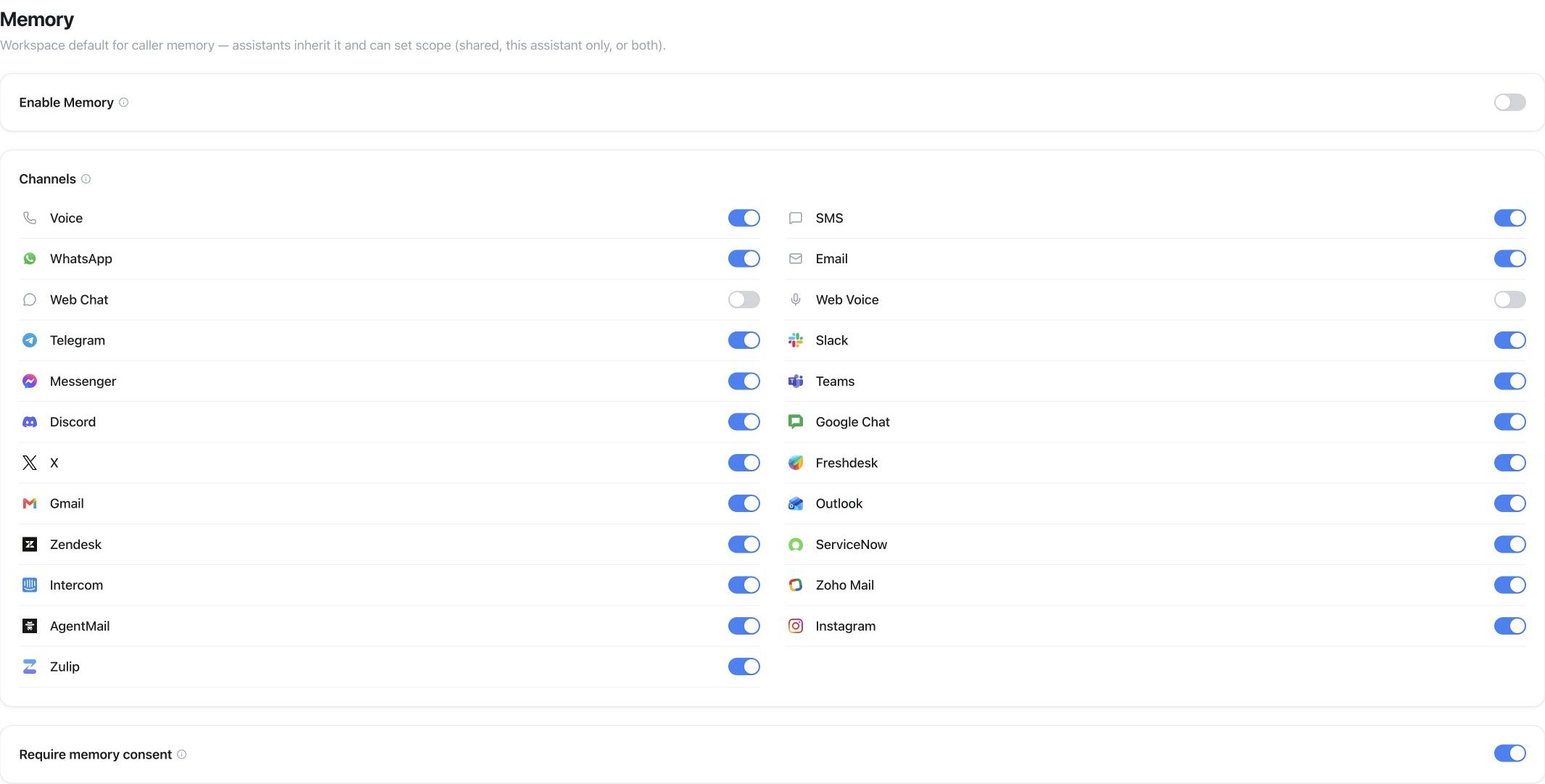
Open **Workspace Settings → Data → Memory** to enable memory, select allowed channels, require consent, and choose a rolling retention period. An assistant can narrow the workspace policy under **Assistant → Settings → Privacy → Caller memory** by selecting read channels, write channels, categories, and a scope.
 Structured contact fields are separate from conversation memory. Under **Assistant → Automations → Variables → Lead attributes**, explicitly select the contact fields that assistant may use; selecting none shares no additional contact fields. Private supervisor consultation and transfer-failure context remain limited to the current call and are not added to caller memory.
Built-in caller fields such as name and email follow the assistant's **Caller memory** switch automatically and do not need individual controls. For custom variables created under **Automations → Variables**, use **Caller memory → Remembered variables** to choose one policy per variable:
| Variable policy | Behavior |
| - | - |
| **None** | Available only during the current call and not retained afterward |
| **Shared** | Stored in the consented workspace memory and available to other assistants |
| **Private** | Stored only in this assistant's consented memory |
Remembered variables use the same consent, channel, retention, staleness, and erasure rules as conversation memory. Lead attributes are already workspace contact fields and therefore remain shared. A **Shared** variable key identifies one workspace-wide datum: use the same key only when every assistant means the same thing by it.
Retention and staleness are separate, independently configured settings. **Retention** decides how long a memory record exists at all — every successful update renews the rolling window, or you can choose to keep records until manually deleted; once retention lapses, the record is deleted. **Staleness** is optional and off by default: enable it and choose a number of days without a successful memory update. Stale content is no longer injected or reused. A later eligible conversation can create fresh memory from that conversation, while the old content remains unavailable until retention cleanup removes it.
```mermaid theme={null}
stateDiagram-v2
[*] --> Active: memory record created
Active --> Active: successful memory update (renews retention)
Active --> Stale: no successful memory update for the chosen number of days
Stale --> Active: eligible conversation creates fresh memory
Active --> [*]: retention lapses (record deleted)
Stale --> [*]: retention lapses (record deleted)
```
| Scope | Behavior |
| - | - |
| `workspace` | One complete summary shared across all assistants |
| `assistant` | One complete summary private to this assistant |
| `both` | Two complete summaries: one shared and one private to this assistant |
Every read, write, consent change, skip, and deletion is audited. **Audience → Memory** lets workspace admins grant or withdraw consent and erase all shared and assistant-scoped memories for a contact.
## API and MCP
* `GET/PATCH /api/v1/settings/memory` manages the workspace's allowed channels, consent policy, and retention period.
* `GET /api/v1/contacts/memory` lists customer memories.
* `GET/PATCH/DELETE /api/v1/contacts/{id}/memory` reads, updates, or erases a contact's memory. An update must provide the current revision; a stale revision returns `409`.
* Assistant updates can define the memory scope, read and write channels, allowed categories, and the `none`, `workspace`, or `assistant` policy on each custom variable.
Equivalent MCP operations follow the same permissions and return the same customer-facing data as the REST API.
Only retain customer context with a lawful basis. Explicitly denied consent always prevents memory reads and writes. Unknown consent also blocks when the workspace requires consent.
**Audience → Memory** has a compact search button. Open it to search contact names, phone numbers, email addresses, and currently visible shared summaries across all matching contacts. Search combines with the consent filter and applies before pagination. Private, expired, and stale content is excluded. Closing the search clears it. The list API accepts the optional `search` parameter (up to 200 characters), and the `list_customer_memories` MCP tool offers the same search.
This documentation is built and hosted on [Mintlify](https://mintlify.com), a developer documentation platform.
Structured contact fields are separate from conversation memory. Under **Assistant → Automations → Variables → Lead attributes**, explicitly select the contact fields that assistant may use; selecting none shares no additional contact fields. Private supervisor consultation and transfer-failure context remain limited to the current call and are not added to caller memory.
Built-in caller fields such as name and email follow the assistant's **Caller memory** switch automatically and do not need individual controls. For custom variables created under **Automations → Variables**, use **Caller memory → Remembered variables** to choose one policy per variable:
| Variable policy | Behavior |
| - | - |
| **None** | Available only during the current call and not retained afterward |
| **Shared** | Stored in the consented workspace memory and available to other assistants |
| **Private** | Stored only in this assistant's consented memory |
Remembered variables use the same consent, channel, retention, staleness, and erasure rules as conversation memory. Lead attributes are already workspace contact fields and therefore remain shared. A **Shared** variable key identifies one workspace-wide datum: use the same key only when every assistant means the same thing by it.
Retention and staleness are separate, independently configured settings. **Retention** decides how long a memory record exists at all — every successful update renews the rolling window, or you can choose to keep records until manually deleted; once retention lapses, the record is deleted. **Staleness** is optional and off by default: enable it and choose a number of days without a successful memory update. Stale content is no longer injected or reused. A later eligible conversation can create fresh memory from that conversation, while the old content remains unavailable until retention cleanup removes it.
```mermaid theme={null}
stateDiagram-v2
[*] --> Active: memory record created
Active --> Active: successful memory update (renews retention)
Active --> Stale: no successful memory update for the chosen number of days
Stale --> Active: eligible conversation creates fresh memory
Active --> [*]: retention lapses (record deleted)
Stale --> [*]: retention lapses (record deleted)
```
| Scope | Behavior |
| - | - |
| `workspace` | One complete summary shared across all assistants |
| `assistant` | One complete summary private to this assistant |
| `both` | Two complete summaries: one shared and one private to this assistant |
Every read, write, consent change, skip, and deletion is audited. **Audience → Memory** lets workspace admins grant or withdraw consent and erase all shared and assistant-scoped memories for a contact.
## API and MCP
* `GET/PATCH /api/v1/settings/memory` manages the workspace's allowed channels, consent policy, and retention period.
* `GET /api/v1/contacts/memory` lists customer memories.
* `GET/PATCH/DELETE /api/v1/contacts/{id}/memory` reads, updates, or erases a contact's memory. An update must provide the current revision; a stale revision returns `409`.
* Assistant updates can define the memory scope, read and write channels, allowed categories, and the `none`, `workspace`, or `assistant` policy on each custom variable.
Equivalent MCP operations follow the same permissions and return the same customer-facing data as the REST API.
Only retain customer context with a lawful basis. Explicitly denied consent always prevents memory reads and writes. Unknown consent also blocks when the workspace requires consent.
**Audience → Memory** has a compact search button. Open it to search contact names, phone numbers, email addresses, and currently visible shared summaries across all matching contacts. Search combines with the consent filter and applies before pagination. Private, expired, and stale content is excluded. Closing the search clears it. The list API accepts the optional `search` parameter (up to 200 characters), and the `list_customer_memories` MCP tool offers the same search.
This documentation is built and hosted on [Mintlify](https://mintlify.com), a developer documentation platform.