> ## Documentation Index
> Fetch the complete documentation index at: https://docs.famulor.io/llms.txt
> Use this file to discover all available pages before exploring further.
# Languages
> Single-language setup, multilingual assistants, and automatic language switching
Choose the assistant's default spoken language, optionally allow additional languages, and select a voice for each language where the engine supports it.
## Setting the primary language
The **primary language** sets the assistant's default spoken language. Engines with separate speech recognition also use this setting to configure recognition. Choose the language you want the assistant to speak by default.
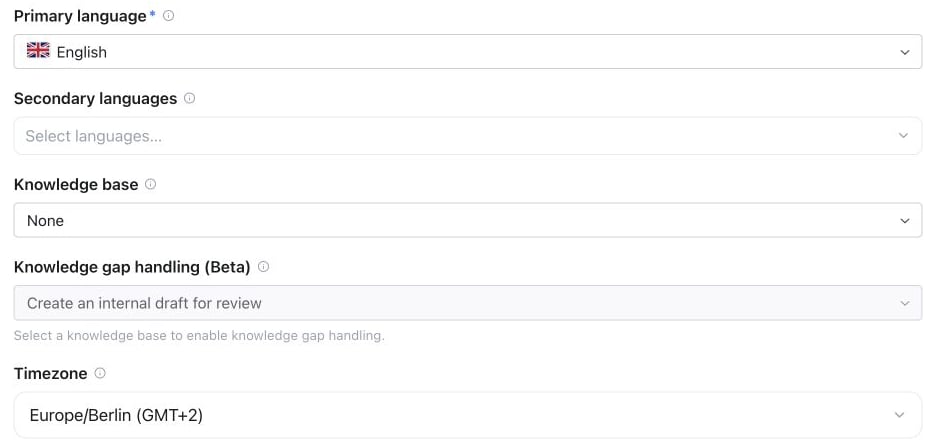 Without a distinct secondary language, the assistant stays in its primary language. Keep prompt instructions consistent with these settings; a prompt is not a replacement for configuring the allowed languages.
Where separate turn detection is available, you can use a multilingual semantic model, an English-optimized variant, or voice activity detection. Full Duplex handles conversational timing differently; these separate controls do not apply to it.
## Multilingual assistants
To allow **automatic language switching**:
1. Set the **primary language** as the default.
2. Add a **secondary language different from the primary language**. Switching is enabled only while a distinct secondary language is configured, and is limited to the selected languages.
3. For engines with separate speech recognition, choose a **multilingual recognition model** that supports those languages.
4. Optionally choose a **voice per language** where the engine supports it. The assistant uses the matching voice when switching to an allowed language.
The assistant receives the configured language policy. If you add switching instructions to the prompt, apply them only when a secondary language is configured and keep them within the selected languages. An isolated foreign word or brand name does not by itself require a language switch.
Per-language voice choices are available for **Pipeline** and **Half-cascade** because those [engine modes](/assistants/engine-modes) use a separate speaking voice. **Realtime**, including Full Duplex, keeps its selected native voice across languages.
Switching the editor view to **Voice per language** does not change the assistant by itself. Choose a voice for a language to save an override; languages without one keep the assistant's main voice.
## Languages and voices
Each voice can speak a specific set of languages. The editor only offers primary and secondary languages the assistant's voice can speak, and the voice library can be filtered by language.
The same rule applies when you save in the dashboard, through the API or through MCP. For **Pipeline** and **Half-cascade** assistants, the primary language, the secondary languages and every language with its own voice must be languages the voice can speak:
* A new assistant is checked in full. If you create it without choosing a voice, a default voice that speaks the primary language is selected automatically.
* An existing assistant is checked in full when you switch to a voice from a different voice provider, or switch the engine to Pipeline or Half-cascade. Otherwise only the languages you add are checked: choosing another voice from the same provider keeps the current languages, and unrelated edits keep working. If the platform has to replace a voice that is no longer available, the current languages are kept as well.
* Restoring an earlier version follows the same rule.
* **Realtime**, including Full Duplex, speaks with its native voice and isn't affected.
If a change is rejected, choose a voice that supports those languages, or remove the languages it can't speak.
## German (Switzerland)
Choose **German (Switzerland)** to request Swiss German (Schweizerdeutsch). This is a dialect preference within the language selector; no separate region setting is required. **German** continues to request standard German.
* **Pipeline and Half-cascade:** recognition uses German while response instructions request Swiss German. Choose a voice suited to Swiss pronunciation and listen to a test conversation; a German-speaking voice does not guarantee a Swiss accent.
* **Realtime, including Full Duplex:** the model receives dialect instructions with the selected native voice. Dialect consistency and regional pronunciation depend on that model and voice.
* **Translate:** uses its own source and target language list. This option does not add Swiss German to translation engines.
You may combine Swiss German with English or another supported language. Do not select **German** and **German (Switzerland)** together: automatic language detection cannot reliably distinguish them. To prefer a regional dialect, add a short instruction such as “Sprich Züritüütsch” to the prompt. Write fixed greetings and saved announcements in the intended dialect; existing recordings and exact scripts keep their wording. Automatically generated platform messages use Swiss German after translation is ready, with German as their temporary fallback.
The language code is `gsw`. `de-CH` remains a standard-German locale and is not an alias for this dialect option. List enabled choices with `GET /api/v1/languages`, MCP `get_languages`, or `famulor list-languages`. Set the language with `PATCH /api/v1/assistants/{id}` using `{"primary_language":"gsw","secondary_languages":["en"]}`, or the same fields in MCP `update_assistant`.
```bash theme={null}
famulor update-assistant ASSISTANT_ID --primary-language gsw --secondary-languages en
```
Test understanding, dates, names, and switching back from a secondary language before publishing.
## Regional prompt examples
For the regional variants below, select the existing base language and add the matching example to your assistant’s instructions. These are prompt preferences, not additional language-selector options. The examples are written in the intended spoken language and are starting points to adapt to your business.
### What the settings handle automatically
| Setting or instruction | Purpose |
| - | - |
| Primary and secondary languages | Define the default language and permitted language switches. |
| German (Switzerland) | Adds Swiss German dialect guidance automatically. An optional regional preference can refine it. |
| Assistant prompt | Adds regional vocabulary, tone, pronunciation preferences and business instructions. |
The platform combines its language policy with your assistant’s instructions for the model. Keep them consistent: a regional prompt does not enable an unselected language or override the configured language list. If you allow secondary languages, apply each regional preference only when speaking its matching language.
**Select: German.**
```text theme={null}
Wenn du Deutsch sprichst, verwende natürliches österreichisches Deutsch mit passendem Wortschatz, Satzmelodie und Aussprache.
Nutze regionale Wörter wie „Lift“ und eine passende Begrüßung wie „Grüß Gott“, ohne den Dialekt zu übertreiben.
```
**Select: German.**
```text theme={null}
Wenn du Deutsch sprichst, verwende gut verständlichen bairischen Dialekt mit regionalem Wortschatz und Grammatik.
Bleib natürlich und freundlich. Namen, Zahlen und Termine müssen klar verständlich bleiben.
```
**Select: French.**
```text theme={null}
Quand tu parles français, utilise un français québécois naturel, avec le vocabulaire et la prononciation du Québec.
Utilise par exemple « cellulaire » et « stationnement » quand le contexte s’y prête, sans caricaturer l’accent.
```
**Select: Portuguese.**
```text theme={null}
Quando falares português, usa português europeu, com vocabulário, gramática e pronúncia de Portugal.
Usa, por exemplo, « telemóvel » e « para si » quando forem adequados ao contexto.
```
**Select: Portuguese.**
```text theme={null}
Quando falar português, use português brasileiro natural, com vocabulário, gramática e pronúncia do Brasil.
Use, por exemplo, “celular” e “você” quando forem adequados ao contexto.
```
**Select: English.**
```text theme={null}
When speaking English, use natural British English with British vocabulary, spelling and pronunciation.
Use words such as “mobile phone” and “lift” when appropriate. Keep names, numbers and appointments clear.
```
**Select: Spanish.**
```text theme={null}
Cuando hables español, usa español mexicano natural, con vocabulario y pronunciación de México.
Usa, por ejemplo, « celular » y « elevador » cuando corresponda, sin exagerar el acento.
```
**Select: Arabic.**
```text theme={null}
لما تتكلم عربي، اتكلم بالمصري الطبيعي، بكلمات وتعبيرات ونطق مصري من غير مبالغة.
خلّي الأسماء والأرقام والمواعيد واضحة ودقيقة، واستخدم تعبيرات زي «بكره» لما تناسب الكلام.
```
### Check the result with your engine
* **Pipeline and Half-cascade:** the prompt shapes the generated wording. The selected speaking voice strongly influences accent and pronunciation; choose a suitable voice or per-language voice where available.
* **Realtime, including Full Duplex:** the native speech model receives the regional direction in its instructions. The outcome depends on the model and selected voice.
* **Fixed greetings and recordings:** write the desired wording into fixed scripts. Prompt edits do not rewrite uploaded recordings.
Listen to several turns, interrupt a reply, check names and appointment details, and switch to an allowed secondary language and back. A good short sample does not guarantee a consistent accent throughout every call.
## Full Duplex pronunciation and prompts
Full Duplex is guided to use natural, neutral pronunciation and rhythm in the configured spoken language by default. Explicit regional or name-pronunciation instructions in your prompt are respected. It does not automatically imitate the caller's accent, and no particular accent is guaranteed: results still depend on the selected voice and the model's support for the language.
Write the prompt and spoken examples in the intended **primary spoken language** where possible. For example, for a German-speaking assistant:
```text theme={null}
Sprich natürliches Deutsch mit klarer Aussprache und einem ruhigen Gesprächsrhythmus.
```
Keep this guidance aligned with the primary and secondary language settings. Add a language-switching rule only if you have configured a distinct secondary language.
## API and MCP
The same language and voice settings are available through `PATCH /api/v1/assistants/{id}` and the MCP `update_assistant` tool. Use `GET /api/v1/languages` to list supported ISO 639-1 / ISO 639-3 language codes; see the API reference for the request fields. Through the REST API, a rejected change returns `400` with the error code `invalid_request`; the MCP tools return the same message as a tool error.
## Pronunciation across languages
The [pronunciation dictionary](/assistants/models-and-voices#speaking-style) applies to **TTS speech**, including supported languages and per-language TTS voices. Workspace administrators can define a default map that merges with per-assistant entries.
The dictionary does **not currently apply to native Full Duplex speech**. For native speech, add explicit pronunciation instructions for names or brands to the assistant's prompt.
## Post-call summary language
The **Conversation Summary** on a call detail is always written in the assistant's **primary language** — not in the language the call was held in. A German assistant that took a call in English still gets a German summary, so a history list stays readable in one language. Re-evaluating a call (History → Re-evaluate) uses the same rule.
Everything else stays in the original language: the transcript, recordings, and extracted analysis fields are never translated.
When you change the primary language, only **new** summaries follow it. Use **Re-evaluate** on an older call to regenerate its summary in the new language.
## Documentation vs. call language
Note that the platform UI language and the assistant's call language are independent: your team can operate an English dashboard while assistants speak German to customers, and vice versa.
The language catalog includes two-letter codes and three-letter codes where needed, such as `ceb` for Cebuano. Available choices depend on both the speaking model and speech recognition. A language in the catalog is not supported by every model; check the choices shown for your assistant. Voice quality, accents, and supported writing systems can vary by language.
This documentation is built and hosted on [Mintlify](https://mintlify.com), a developer documentation platform.
Without a distinct secondary language, the assistant stays in its primary language. Keep prompt instructions consistent with these settings; a prompt is not a replacement for configuring the allowed languages.
Where separate turn detection is available, you can use a multilingual semantic model, an English-optimized variant, or voice activity detection. Full Duplex handles conversational timing differently; these separate controls do not apply to it.
## Multilingual assistants
To allow **automatic language switching**:
1. Set the **primary language** as the default.
2. Add a **secondary language different from the primary language**. Switching is enabled only while a distinct secondary language is configured, and is limited to the selected languages.
3. For engines with separate speech recognition, choose a **multilingual recognition model** that supports those languages.
4. Optionally choose a **voice per language** where the engine supports it. The assistant uses the matching voice when switching to an allowed language.
The assistant receives the configured language policy. If you add switching instructions to the prompt, apply them only when a secondary language is configured and keep them within the selected languages. An isolated foreign word or brand name does not by itself require a language switch.
Per-language voice choices are available for **Pipeline** and **Half-cascade** because those [engine modes](/assistants/engine-modes) use a separate speaking voice. **Realtime**, including Full Duplex, keeps its selected native voice across languages.
Switching the editor view to **Voice per language** does not change the assistant by itself. Choose a voice for a language to save an override; languages without one keep the assistant's main voice.
## Languages and voices
Each voice can speak a specific set of languages. The editor only offers primary and secondary languages the assistant's voice can speak, and the voice library can be filtered by language.
The same rule applies when you save in the dashboard, through the API or through MCP. For **Pipeline** and **Half-cascade** assistants, the primary language, the secondary languages and every language with its own voice must be languages the voice can speak:
* A new assistant is checked in full. If you create it without choosing a voice, a default voice that speaks the primary language is selected automatically.
* An existing assistant is checked in full when you switch to a voice from a different voice provider, or switch the engine to Pipeline or Half-cascade. Otherwise only the languages you add are checked: choosing another voice from the same provider keeps the current languages, and unrelated edits keep working. If the platform has to replace a voice that is no longer available, the current languages are kept as well.
* Restoring an earlier version follows the same rule.
* **Realtime**, including Full Duplex, speaks with its native voice and isn't affected.
If a change is rejected, choose a voice that supports those languages, or remove the languages it can't speak.
## German (Switzerland)
Choose **German (Switzerland)** to request Swiss German (Schweizerdeutsch). This is a dialect preference within the language selector; no separate region setting is required. **German** continues to request standard German.
* **Pipeline and Half-cascade:** recognition uses German while response instructions request Swiss German. Choose a voice suited to Swiss pronunciation and listen to a test conversation; a German-speaking voice does not guarantee a Swiss accent.
* **Realtime, including Full Duplex:** the model receives dialect instructions with the selected native voice. Dialect consistency and regional pronunciation depend on that model and voice.
* **Translate:** uses its own source and target language list. This option does not add Swiss German to translation engines.
You may combine Swiss German with English or another supported language. Do not select **German** and **German (Switzerland)** together: automatic language detection cannot reliably distinguish them. To prefer a regional dialect, add a short instruction such as “Sprich Züritüütsch” to the prompt. Write fixed greetings and saved announcements in the intended dialect; existing recordings and exact scripts keep their wording. Automatically generated platform messages use Swiss German after translation is ready, with German as their temporary fallback.
The language code is `gsw`. `de-CH` remains a standard-German locale and is not an alias for this dialect option. List enabled choices with `GET /api/v1/languages`, MCP `get_languages`, or `famulor list-languages`. Set the language with `PATCH /api/v1/assistants/{id}` using `{"primary_language":"gsw","secondary_languages":["en"]}`, or the same fields in MCP `update_assistant`.
```bash theme={null}
famulor update-assistant ASSISTANT_ID --primary-language gsw --secondary-languages en
```
Test understanding, dates, names, and switching back from a secondary language before publishing.
## Regional prompt examples
For the regional variants below, select the existing base language and add the matching example to your assistant’s instructions. These are prompt preferences, not additional language-selector options. The examples are written in the intended spoken language and are starting points to adapt to your business.
### What the settings handle automatically
| Setting or instruction | Purpose |
| - | - |
| Primary and secondary languages | Define the default language and permitted language switches. |
| German (Switzerland) | Adds Swiss German dialect guidance automatically. An optional regional preference can refine it. |
| Assistant prompt | Adds regional vocabulary, tone, pronunciation preferences and business instructions. |
The platform combines its language policy with your assistant’s instructions for the model. Keep them consistent: a regional prompt does not enable an unselected language or override the configured language list. If you allow secondary languages, apply each regional preference only when speaking its matching language.
**Select: German.**
```text theme={null}
Wenn du Deutsch sprichst, verwende natürliches österreichisches Deutsch mit passendem Wortschatz, Satzmelodie und Aussprache.
Nutze regionale Wörter wie „Lift“ und eine passende Begrüßung wie „Grüß Gott“, ohne den Dialekt zu übertreiben.
```
**Select: German.**
```text theme={null}
Wenn du Deutsch sprichst, verwende gut verständlichen bairischen Dialekt mit regionalem Wortschatz und Grammatik.
Bleib natürlich und freundlich. Namen, Zahlen und Termine müssen klar verständlich bleiben.
```
**Select: French.**
```text theme={null}
Quand tu parles français, utilise un français québécois naturel, avec le vocabulaire et la prononciation du Québec.
Utilise par exemple « cellulaire » et « stationnement » quand le contexte s’y prête, sans caricaturer l’accent.
```
**Select: Portuguese.**
```text theme={null}
Quando falares português, usa português europeu, com vocabulário, gramática e pronúncia de Portugal.
Usa, por exemplo, « telemóvel » e « para si » quando forem adequados ao contexto.
```
**Select: Portuguese.**
```text theme={null}
Quando falar português, use português brasileiro natural, com vocabulário, gramática e pronúncia do Brasil.
Use, por exemplo, “celular” e “você” quando forem adequados ao contexto.
```
**Select: English.**
```text theme={null}
When speaking English, use natural British English with British vocabulary, spelling and pronunciation.
Use words such as “mobile phone” and “lift” when appropriate. Keep names, numbers and appointments clear.
```
**Select: Spanish.**
```text theme={null}
Cuando hables español, usa español mexicano natural, con vocabulario y pronunciación de México.
Usa, por ejemplo, « celular » y « elevador » cuando corresponda, sin exagerar el acento.
```
**Select: Arabic.**
```text theme={null}
لما تتكلم عربي، اتكلم بالمصري الطبيعي، بكلمات وتعبيرات ونطق مصري من غير مبالغة.
خلّي الأسماء والأرقام والمواعيد واضحة ودقيقة، واستخدم تعبيرات زي «بكره» لما تناسب الكلام.
```
### Check the result with your engine
* **Pipeline and Half-cascade:** the prompt shapes the generated wording. The selected speaking voice strongly influences accent and pronunciation; choose a suitable voice or per-language voice where available.
* **Realtime, including Full Duplex:** the native speech model receives the regional direction in its instructions. The outcome depends on the model and selected voice.
* **Fixed greetings and recordings:** write the desired wording into fixed scripts. Prompt edits do not rewrite uploaded recordings.
Listen to several turns, interrupt a reply, check names and appointment details, and switch to an allowed secondary language and back. A good short sample does not guarantee a consistent accent throughout every call.
## Full Duplex pronunciation and prompts
Full Duplex is guided to use natural, neutral pronunciation and rhythm in the configured spoken language by default. Explicit regional or name-pronunciation instructions in your prompt are respected. It does not automatically imitate the caller's accent, and no particular accent is guaranteed: results still depend on the selected voice and the model's support for the language.
Write the prompt and spoken examples in the intended **primary spoken language** where possible. For example, for a German-speaking assistant:
```text theme={null}
Sprich natürliches Deutsch mit klarer Aussprache und einem ruhigen Gesprächsrhythmus.
```
Keep this guidance aligned with the primary and secondary language settings. Add a language-switching rule only if you have configured a distinct secondary language.
## API and MCP
The same language and voice settings are available through `PATCH /api/v1/assistants/{id}` and the MCP `update_assistant` tool. Use `GET /api/v1/languages` to list supported ISO 639-1 / ISO 639-3 language codes; see the API reference for the request fields. Through the REST API, a rejected change returns `400` with the error code `invalid_request`; the MCP tools return the same message as a tool error.
## Pronunciation across languages
The [pronunciation dictionary](/assistants/models-and-voices#speaking-style) applies to **TTS speech**, including supported languages and per-language TTS voices. Workspace administrators can define a default map that merges with per-assistant entries.
The dictionary does **not currently apply to native Full Duplex speech**. For native speech, add explicit pronunciation instructions for names or brands to the assistant's prompt.
## Post-call summary language
The **Conversation Summary** on a call detail is always written in the assistant's **primary language** — not in the language the call was held in. A German assistant that took a call in English still gets a German summary, so a history list stays readable in one language. Re-evaluating a call (History → Re-evaluate) uses the same rule.
Everything else stays in the original language: the transcript, recordings, and extracted analysis fields are never translated.
When you change the primary language, only **new** summaries follow it. Use **Re-evaluate** on an older call to regenerate its summary in the new language.
## Documentation vs. call language
Note that the platform UI language and the assistant's call language are independent: your team can operate an English dashboard while assistants speak German to customers, and vice versa.
The language catalog includes two-letter codes and three-letter codes where needed, such as `ceb` for Cebuano. Available choices depend on both the speaking model and speech recognition. A language in the catalog is not supported by every model; check the choices shown for your assistant. Voice quality, accents, and supported writing systems can vary by language.
This documentation is built and hosted on [Mintlify](https://mintlify.com), a developer documentation platform.