> ## Documentation Index
> Fetch the complete documentation index at: https://docs.famulor.io/llms.txt
> Use this file to discover all available pages before exploring further.
# Prompt Templates
> Build reusable starting points for your customers' assistants — a system prompt, first message, and optional flow
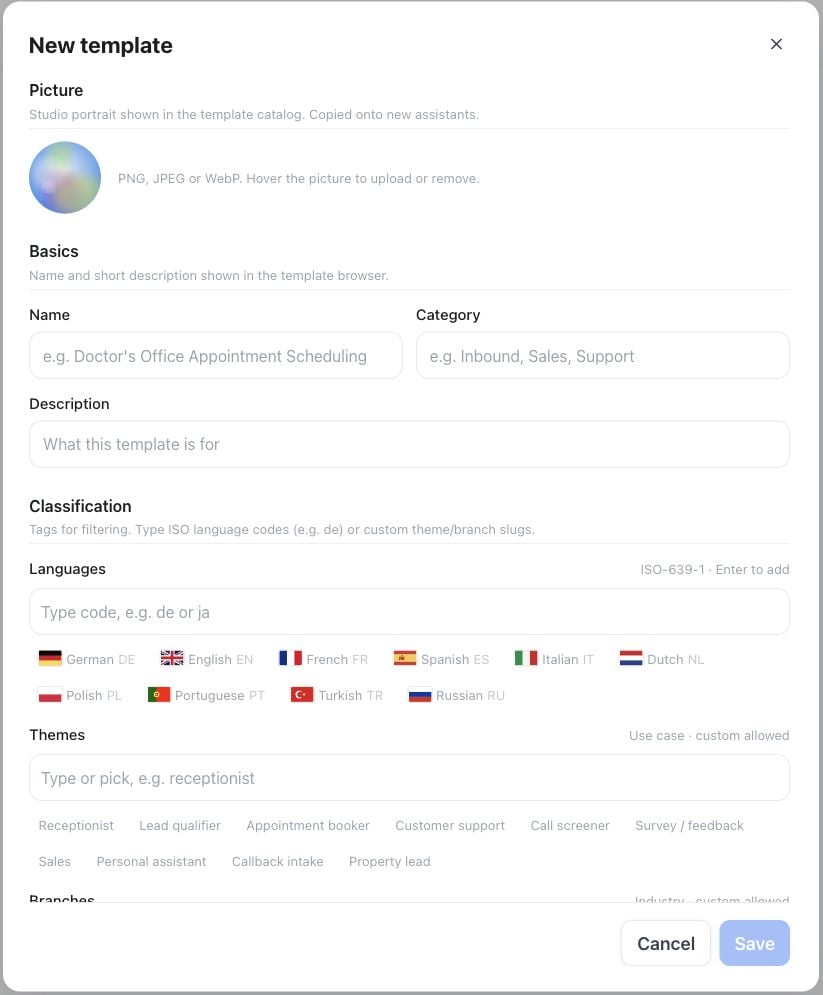
**Whitelabel Admin → Prompt templates** is where you build the catalog of starting points your customers see when they create a new assistant. A template is a reusable draft — name, description, picture, system prompt, first message, and classification tags — that a customer can preview and apply as a copy.
Open **Whitelabel Admin → Prompt templates → New template**. Start with **Name**, **Category** and **Description**, then add classification tags. Scroll within the editor to add the prompt and first message before selecting **Save**. The screenshot shows the initial, unsaved form.
 ## What a template holds
| Field | Purpose |
| - | - |
| Picture | Studio portrait shown in the template catalog; copied onto new assistants that use the template |
| Name / Category | Shown in the template browser, e.g. "Receptionist" / "Inbound" |
| Description | Short explanation of what the template is for |
| Content | The assistant's system prompt |
| First message | The assistant's opening line |
| Languages | ISO-639-1 tags for filtering (e.g. `de`, `en`) |
| Themes | Use-case tags — receptionist, lead qualifier, appointment booker, support, call screener, survey, sales, personal assistant, and more |
| Branches | Industry tags — general, healthcare, dental, real estate, home services, SaaS/B2B, hospitality, legal, automotive, e-commerce, education |
| Sort order / Active | Where it appears in the catalog, and whether it's currently offered |
Most templates hold a plain system prompt. A template can also carry a saved flow — when a customer applies one of these, Famulor seeds the assistant's Flow Builder canvas instead of a plain prompt.
## Where customers see it
A customer picks a template while creating a new assistant, or later from the system-prompt card on an existing assistant. They preview it, then apply a copy. **Later changes to the template never overwrite an existing assistant** — applying a template copies its content once; it does not create a live link back to the template.
## Scope
Templates you create in Whitelabel Admin are available to your own reseller team and to your customer workspaces. Delete or deactivate a template to remove it from the catalog; existing assistants that already applied it are unaffected.
## API and MCP
The customer-visible catalog is read-only through `GET /api/v1/prompt-templates` and the MCP `list_prompt_templates` tool — useful if you want to surface your template catalog in your own UI. Creating and editing templates themselves is a Whitelabel Admin dashboard action; there is no write API for template management.
See also [White Label Program](/admin/tenants-and-whitelabel) for how visibility and other white-label customizations work together, and [Flow builder](/flow-builder/overview) for how flow-based templates behave once applied.
This documentation is built and hosted on [Mintlify](https://mintlify.com), a developer documentation platform.
## What a template holds
| Field | Purpose |
| - | - |
| Picture | Studio portrait shown in the template catalog; copied onto new assistants that use the template |
| Name / Category | Shown in the template browser, e.g. "Receptionist" / "Inbound" |
| Description | Short explanation of what the template is for |
| Content | The assistant's system prompt |
| First message | The assistant's opening line |
| Languages | ISO-639-1 tags for filtering (e.g. `de`, `en`) |
| Themes | Use-case tags — receptionist, lead qualifier, appointment booker, support, call screener, survey, sales, personal assistant, and more |
| Branches | Industry tags — general, healthcare, dental, real estate, home services, SaaS/B2B, hospitality, legal, automotive, e-commerce, education |
| Sort order / Active | Where it appears in the catalog, and whether it's currently offered |
Most templates hold a plain system prompt. A template can also carry a saved flow — when a customer applies one of these, Famulor seeds the assistant's Flow Builder canvas instead of a plain prompt.
## Where customers see it
A customer picks a template while creating a new assistant, or later from the system-prompt card on an existing assistant. They preview it, then apply a copy. **Later changes to the template never overwrite an existing assistant** — applying a template copies its content once; it does not create a live link back to the template.
## Scope
Templates you create in Whitelabel Admin are available to your own reseller team and to your customer workspaces. Delete or deactivate a template to remove it from the catalog; existing assistants that already applied it are unaffected.
## API and MCP
The customer-visible catalog is read-only through `GET /api/v1/prompt-templates` and the MCP `list_prompt_templates` tool — useful if you want to surface your template catalog in your own UI. Creating and editing templates themselves is a Whitelabel Admin dashboard action; there is no write API for template management.
See also [White Label Program](/admin/tenants-and-whitelabel) for how visibility and other white-label customizations work together, and [Flow builder](/flow-builder/overview) for how flow-based templates behave once applied.
This documentation is built and hosted on [Mintlify](https://mintlify.com), a developer documentation platform.